Getting Google AdSense approval is a very good news to hear. Normally, people want the ads to appear on their website immediately and as many as possible. Then, they started to reason why the revenue is small after displaying so many ads along with the journey and age of the website itself. This is how Google AdSense Ad Balance will help to solve this.
Imagine that you have a pouch of granites and you need to separate the granites from the sand covering it. You will use a filter to let the sand go while keeping the granites within the neck filter. The same way happens to Google AdSense Ad Balance.
Open your AdSense and go to My Ads > Ad Balance. You will be presented with three bars, Estimated, Ads and Ad fill rate. Estimated and Ads are not adjustable and the Ad fill rate one is adjustable.
Sliding your Ad fill rate to the right means loosening your filter. Slide it to the left means tightening your filter.
Here is the simple way to adjust it to get the maximum (estimated) revenue:
Slide it all the way to the left
Slowly slide it to the right until the Estimated section shows 100%
That’s it. You’re done. But, you might want to slide it a bit over because AdSense is hard to predict. You might find that your Estimated section shows 99% after not checking it for a couple of days. Check regularly, and keep the estimation 100% by sliding the Ad fill rate bar to left and right.
This is my first AMP page, by “first” here means that I made this AMP page on purpose using an AMP Page Builder, not converted automatically, not as my previous “AMP” pages. I’m tempted to make this AMP page because I made a tutorial about how to use AdSense Auto Ads for AMP (AMP Auto Ads) yesterday.
AMP Auto Ads works the same way as AdSense Auto Ads. It will fill our pages with advertisements according to their calculations. The only difference is that AMP Auto Ads works on mobile while Auto Ads works on desktop sites. It’s best if you have both to get more revenue from different users using different platforms.
As you can see in the video, applying AdSense Auto Ads is not difficult for both WordPress user and other CMS users. All we have to do is placing the code in both header and footer. And it will work like a charm.
How To Get AMP Auto Ads Code and Apply It To Our WordPress Website
If you have difficulties finding the code, you can find it in the Optimization > Labs.
Install the plugins of your choice. I’m using Header and Footer.
Go to the AMP section and paste both in the header and footer area.
Having an AMP site is also good for you as the publisher. Google has been working on AMP seriously, and also does WordPress. AMP allows your web visitor to experience faster and smoother activity on your website. Besides, having a working AMP website prevent us from getting the terrifying crawling error Google tends to warn us about.
Just now, I got a notification that Google has launched its new product for AdSense called AdSense Auto ads. Its name is self-explanatory, this is the type of ad that works automatically.
Of course, this is not only greeted happily by the bloggers, but also by all users of AdSense. I focus on bloggers because as a blogger who does not like complicated things like me, writing is the only fun thing to do. And this is now being managed by Google AdSense.
They let you focus on creating great content. Auto ads automatically place and optimize your ads for you so you don’t have to spend time doing it yourself.
They potentially increase your revenue. Auto ads analyze your pages and find new places to show ads based on your layout, content, and existing Google ads.
They’re easy to use. You place the same piece of code just once on each page that you want to show Auto ads. Google takes care of the rest.
Those three points sound very beneficial for me.
Watch The Video for Step by Step Process:
But…
There is something quite worrying for me, namely the existence of Vignette ads (which we can disregard its use manually). Vignette ads will appear every time our web visitor moves from one page to another.
Well, I had a bad experience with this type of ad. I think this is very annoying, and I tend to avoid nets that use this type of advertising. But we’ll see. I’m sure this is not something that geniuses in the Google lab are overlooked.
These Are The Types of Ads “Brought” by Auto ads:
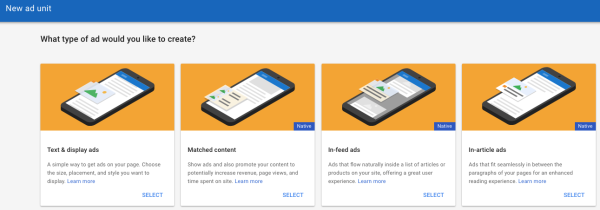
Matched content is the latest ad unit from Google AdSense that displays the suggestions of pages that contain the content of our entire web and is accompanied by advertisements from the outside. This ad only appears in the mobile version (along with Auto ads).
Text & display that can appear anywhere in our web pages.
In-article ads are ads that appear as delimiters in our articles, for example between paragraphs. With the note, the article should have an adequate length.
In-feed ads work like In-article, only, In-feeds only appear on mobile devices.
How to Use it
How to use it is relatively easy, namely by pinning the code provided by AdSense into the <head> of each page that we expect will bring Auto ads.
Just now, I got a notification that Google has launched its new product for AdSense called AdSense Auto ads. Its name is self-explanatory, this is the type of ad that works automatically.
Of course, this is not only greeted happily by the bloggers, but also by all users of AdSense. I focus on bloggers because as a blogger who does not like complicated things like me, writing is the only fun thing to do. And this is now being managed by Google AdSense.
They let you focus on creating great content. Auto ads automatically place and optimize your ads for you so you don’t have to spend time doing it yourself.
They potentially increase your revenue. Auto ads analyze your pages and find new places to show ads based on your layout, content, and existing Google ads.
They’re easy to use. You place the same piece of code just once on each page that you want to show Auto ads. Google takes care of the rest.
Those three points sound very beneficial for me.
Here it is from one step to another:
But…
There is something quite worrying for me, namely the existence of Vignette ads (which we can disregard its use manually). Vignette ads will appear every time our web visitor moves from one page to another.
Well, I had a bad experience with this type of ad. I think this is very annoying, and I tend to avoid nets that use this type of advertising. But we’ll see. I’m sure this is not something that geniuses in the Google lab are overlooked.
These Are The Types of Ads “Brought” by Auto ads:
Matched content is the latest ad unit from Google AdSense that displays the suggestions of pages that contain the content of our entire web and is accompanied by advertisements from the outside. This ad only appears in the mobile version (along with Auto ads).
Text & display that can appear anywhere in our web pages.
In-article ads are ads that appear as delimiters in our articles, for example between paragraphs. With the note, the article should have an adequate length.
In-feed ads work like In-article, only, In-feeds only appear on mobile devices.
How to Use it
How to use it is relatively easy, namely by pinning the code provided by AdSense into the <head> of each page that we expect will bring Auto ads.
Recently this morning I bumped on the notification from Google when I opened my Opportunities tab on my Google AdSense account. I believe you can see the very same notification like mine on your Google AdSense account by going to Optimization > Opportunities. Google AdSense Matched Content Unit works like its name describes, sending you ads that matched your contents.
It’s not a new thing for SEO and SEM activist since there is also some other Ads agency offering the same advertisement method. Even before Google launched this Matched Content Unit. You can see some of them on gossips and software download websites. But, most of the contents are mostly from HOAX to some impossible life hacks, such as getting rich with a single click (if this really happens, I would be writing this article from my own planet, or an AI will be writing this… also on my own planet).
If you don’t see Matched content under “My sites” then you’re not currently eligible to use the Matched content.
On the “Matched content” page, check to see if your site is listed:
If your site is listed, you may place Matched content units on any of its pages.
If your site isn’t listed, then it’s not currently eligible for Matched content.
If at least one of your sites is eligible, you’ll see the option to create Matched content units under the My ads tab in your account.
Google AdSense Matched Content unit will also cover your subdomain. So, if you have let’s say digressingme.cool, then movies.digressingme.cool will be included as one of the eligible sites.
If you’re a publisher with multiple sites, you might find that only some of your sites are eligible for Matched content. In this case, we ask that you only place Matched content units on your eligible sites. If you place Matched content units on ineligible sites, then we won’t be able to populate the units with recommendations.
Conclusion
Basically, Google AdSense Matched Content Unit offers the same result as if we put our internal link on the articles. See the “Also reads” link I put here? But, it also enables you to monetize your link instead of merely just opening a new page.
Hi guys, now it’s time for me to share how to cheat AdSense.
I’m lucky enough to experience living in the era when being a geek is considered cool. People have been using different kinds of swag from time to time. From barbaric approach to materialistic approach. But now (I think)… we can impress people simply by a presentation. The presentation comes first, accomplishment and fix come later. Just like how Google does it.
Now, Back To The Topic
Let’s see the video below. If you’re not fond of watching, you can skip the video because I’m going to write everything after the video.
Step by Step Instruction
This is a step by step instruction. So make sure you do it step by step and not randomly (unless stated).
In Amazon (or any other affiliate program)
Make a free affiliate account (I’m using Amazon, but you can use this method with any accounts).
Go to the affiliate tab (up-left on Amazon).
Look for any promotion available for your affiliation.
In AdSense
You must have an approved AdSense account!
Make an ad-unit in the size of the Amazon’s ad code.
Open the ad-unit and then scroll down to where it stated something like, “if no ad available*”
Paste the Amazon ad-code there and replace the part before // with https: in your posted code.
Delete the part after your Amazon name (mine is digressingme-20)
Save the setting and then click “get code” from the ad-unit you just created.
In Your Website
This last part is simple. Just paste the code into the ad placement or anywhere you want it to appear. I recommend to stay away from WordPress appearance editor and stick with the widget placement provided by your theme.
How Does It Work?
The ad-code to you put in your placement/widget supposed to show Google AdSense advertisement only. Sometimes, your web traffic is going down and Google “refuses” to put an advertisement on your website. Hence, the blank yellow area. You can change the color of the blank area, but… blank is still blank.
That’s why we fill the blank with another advertisement you made on Amazon.
If your web has a good traffic, then you might need this method to keep your layout looks good (no blank area, odd coloring etc). Imagine your website like a 24hrs shop now!
If you’re just starting your web, then using this method will allow your web looks like it’s already populated with Google AdSense. So it will give you a richer content.
Well, I guess that’s how to cheat AdSense for now… anyone has something to add?
Just now I read a lot of timeout problem how to increase income from Adsense. Of the many pages I read, I nemu the most hit one in the heart … tsaah … That is the writing on the Klikmania can I quote below:
Already, don't think that's all the others. That thought is how today's writing and how to write content tomorrow. Simple right. …
Yes actually simple not in hell, I also do not find any exact answer on the web. But the web is successfully encouraging I make keep writing hahaha … Read also: Google AdSense Content Unit is Matched Then I nemu web Adsense solved ngebahas other in deeper and complicated. Maybe my brain wrote that he not already given oil, but My kok gak ya? The average web I read that most stupid … tricks increase earnings from Adsense, unfortunately some of the links are given from the web it udah gak functioning again. Then I continue the search know this problem in Google and nemuin free tool below:
What Is SEM?
LAH, the Affairs of SEO (Search Engine Optimization) aja irregularities should instead urusin SEM (Search Engine Marketing)? It's also what SEM? I nemuin web nice about it here. According to IM web CODE, SEM Marketing is acquired by way of paying in order to appear on Search engines. This time I ever ngiklanin rasain I want one of my website so that it appears in Google. Why have to pay if it can free? We can indeed rely on SEO if the content we write on our website including a Blog or Niche that does indeed support create SEO. While if we have web contents for ngiklanin motor repair shop, we might as well not berlebay-lebay write long article-length just create ngasih know customers that we are now selling the spark plug again. This is where we need SEM. Unless you've motorlu classmates Auto Repair Shop 9000 for instance. But there's also that combine SEO with SEM, as did the entertainment and news media. We can see his ads in other media, and they also popped in the search engines when we nyari specific article. Wow, cool Yes if we can already gabungin two ways. I still haven't been able to. Although Google AdWords udah mengiming-imingi bonuses of Rp. 450 thousand (or 150 rb) if I put up an ad again.





 bipolar is-popular_