AdWords Keyword Planner Step by Step For SEM and SEO


AdWords is the best tool for SEM since its fully integrated with AdSense. We can use AdWords feature such as AdWords keyword planner for free to work on our SEO. We will cover this at the end of our topic below. So we can get right into the action. The use itself quite intimidating and confusing if you want to unlock its full potential. For now, let’s make a new Google mail account and do this making new AdWords account process. We have to think as both advertiser and publisher (in my case, blogger) in order to use AdWords properly.

Read this first if you’re not familiar with SEM V SEO.

You can only use one Google account to use Google service, but you can invite other users later.

For Search Engine Marketing (SEM)

  1. Make a new Google account (or use your existing Gmail)
  2. Start your AdWords by signing in with your Google account here
  3. You can see the warning saying something like “balance is exhausted”. That’s because we haven’t put any deposit on AdWords yet.
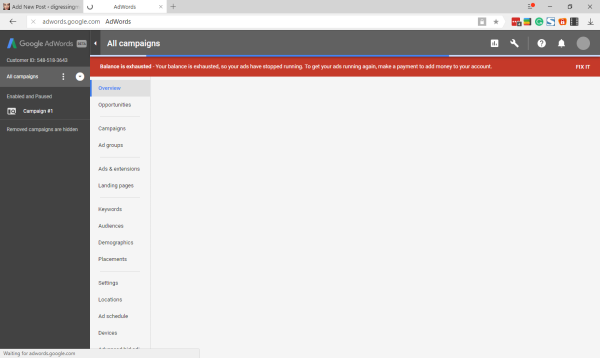
  • Click Fix It and fill the next page with your information.
  • Go to Opportunities > Setup Up A Campaign
  • Pick the type of Campaign that suits you, most probably is the Search type
  • Choose website traffic
The website traffic goal recommends settings and features to help you drive relevant customers to your website
  • Enter your website URL under “Select the ways you’d like to reach your goal”
  • Continue
  • Name your campaign, be brief
  • Set your international targeting, language, and budget
  • Choose the standard delivery method for this test. You can set to accelerated when you’re familiar with your website traffic
  • Set your start and end dates
  • Open more options
  • Set Dynamic Search Ads
  • Continue and Set Up Ad Groups
  • Choose URL and fill with your website URL
  • Save and Continue to Create Ads and Add new ads
  • Fill your Ad description and Check your Ad preview
  • Congratulations! Your campaign is ready.

That’s it. The next thing you have to do is making the deposit to make your Ad running.

For Search Engine Optimization (SEO)

We can also use AdWords for free. Just click the wrench tool button on the top right of the screen. Then go to Planning > Keyword Planner. Let’s put something you can think of that’s related to your website. If you’re making a website about toys, you can try putting it there.

  1. Now see the Avg. Monthly Searches and click it to show the list ordered from the most used to the least used.
  2. Look for the first “Low” in the competition part and look what that Low stands for. And that’s the keyword you might want to use for your next article.

See you and don’t forget to subscribe to my YouTube channel. That’s the least you can do. 🙂
The Easiest Way To Use AdSense Auto Ads on WordPress


Looking For The Easiest Way To Use AdSense Auto Ads?

I was looking for the easiest way to use AdSense Auto Ads on WordPress. That’s because, as a blogger, the most fun thing for me is to earn money from my writing. But unfortunately, it also makes my writing activities so boring.

Just imagine if every time I have to take care of placing AdSense ads in each of my writing. There is already a solution, namely by using plugins such as WP Quads is very cool. However, after AdSense publishes Google AdSense Auto Ads, the plugin seems to be obsolete.

Read here to learn more about Google AdSense Auto Ads.

This causes me to look for the easiest way to use AdSense Auto Ads in order to make the Auto Ads work properly. Fortunately, WordPress always provide answers to all the challenges that I face. And this time the answer is… Advanced Ads.

How To Get Advanced Ads

All you have to do is the steps that we always do to add plugins.

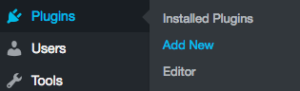
  • That is: Plugins> Add New. Type Advanced Ads, then install and activate.

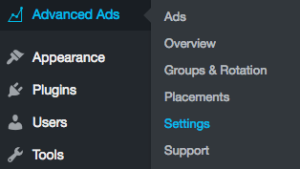
  • Then go to Advanced Ads> Settings.

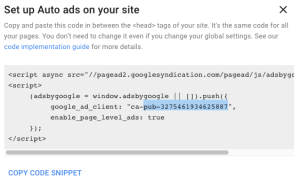
  • Go to AdSense tab, then paste your AdSense ID there, it’s something like pub-blahblahblah (leave the ca- prefix)
  • Click Save settings on this page and you’re all set.

How To Get Your AdSense ID?

Of course, you’ll need a working AdSense account (and approved website) in order to make this tips works.

The Easiest Way To Use AdSense Auto Ads

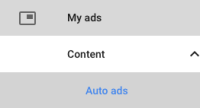
  • Copy the “pub-blahblahblah” and put it on the AdSense tab of Advanced Ads (I wrote in bold red above).

Still, No Ads Shown?

Have you inserted your snippet code in your page header?

Auto Ads requires that you enter the new snippet code in your header page. And this is different from what we previously entered.

To get the code is to click “copy code snippet” which is displayed when we want to see pub-blahblahblah, then paste it into the header of the page we want ads to appear.

Try My Favorite Plugin For Entering Code

I really like the plugin called “Insert Header and Footer”, because this plugin is easy to use. You just need to install this plugin the same way you install Advanced Ads, then find it in the Settings> Insert Header and Footer section.

Paste the Auto Ads snippet code you copy earlier in the header section, then click save. Now all you have to do is do is share this tutorial to your social media and give me a donation through Patreon or PayPal. Cheers.

Just disable the warning in the setting > AdSense. I found the warnings quite irritating!

AdSense Auto Ads

Welcome to AdSense Auto Ads


Again, New Exciting Ads Type Launched by AdSense!

Just now, I got a notification that Google has launched its new product for AdSense called AdSense Auto ads. Its name is self-explanatory, this is the type of ad that works automatically.

Of course, this is not only greeted happily by the bloggers, but also by all users of AdSense. I focus on bloggers because as a blogger who does not like complicated things like me, writing is the only fun thing to do. And this is now being managed by Google AdSense.

Here’s What’s Written on its Official web:

They let you focus on creating great content. Auto ads automatically place and optimize your ads for you so you don’t have to spend time doing it yourself.

They potentially increase your revenue. Auto ads analyze your pages and find new places to show ads based on your layout, content, and existing Google ads.

They’re easy to use. You place the same piece of code just once on each page that you want to show Auto ads. Google takes care of the rest.

Those three points sound very beneficial for me.

Watch The Video for Step by Step Process:

But…

There is something quite worrying for me, namely the existence of Vignette ads (which we can disregard its use manually). Vignette ads will appear every time our web visitor moves from one page to another.

Well, I had a bad experience with this type of ad. I think this is very annoying, and I tend to avoid nets that use this type of advertising. But we’ll see. I’m sure this is not something that geniuses in the Google lab are overlooked.

These Are The Types of Ads “Brought” by Auto ads:

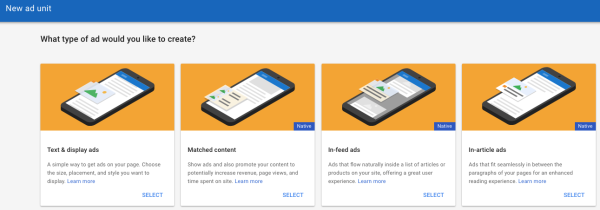
Matched content is the latest ad unit from Google AdSense that displays the suggestions of pages that contain the content of our entire web and is accompanied by advertisements from the outside. This ad only appears in the mobile version (along with Auto ads).

Text & display that can appear anywhere in our web pages.

In-article ads are ads that appear as delimiters in our articles, for example between paragraphs. With the note, the article should have an adequate length.

In-feed ads work like In-article, only, In-feeds only appear on mobile devices.

How to Use it

How to use it is relatively easy, namely by pinning the code provided by AdSense into the <head> of each page that we expect will bring Auto ads.

The code looks like this:

<script async src=”//pagead2.googlesyndication.com/pagead/js/adsbygoogle.js”>

So, you will have to make:

<head>

<script async src=”//pagead2.googlesyndication.com/pagead/js/adsbygoogle.js”>

</head>

However

Some people will be less happy with the launch of this Auto Ads, for example, the makers of AdSense tutorials like me. :_(

The Most Effective Google Ads for Website Placement (With Illustration)


Hi, now we’re going to talk about the most effective Google Ads for website placement. There are many tutorials that discuss where to put ads, even Google itself. But how to make the ads that we put in strategic places that work well?

In order to make the learning process easier, I highly recommend you to read the previous articles below:

Google AdSense, SEM, and SEO.

Maximize the use of WordPress widgets and themes.

Google AdSense Match Content Unit.

Illegal way to cheat AdSense.

Done? Let’s Move to Google Ads for Website Placement

If we are discussing advertising, then we will agree that as good and expensive as an ad will be meaningless if it can not be seen. In addition to making the ad not reach the target, the ad also means die from circulation. Often I see an ad, but it turned out that the ad reached me when the validity period is up. Usually, this is found in discount ads or events that are not routine. Of course, this is detrimental to advertisers and also to us as publishers are “forced” to give up our advertising columns used by useless advertisements. And Google also assumes the same. Google will not put high-value ads on websites that have low traffic.

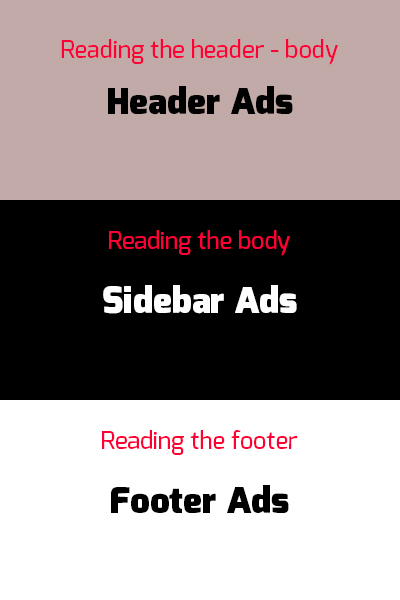
Well, how to make ads that appear on our web pages hit the target? Let’s look at the illustrations below:

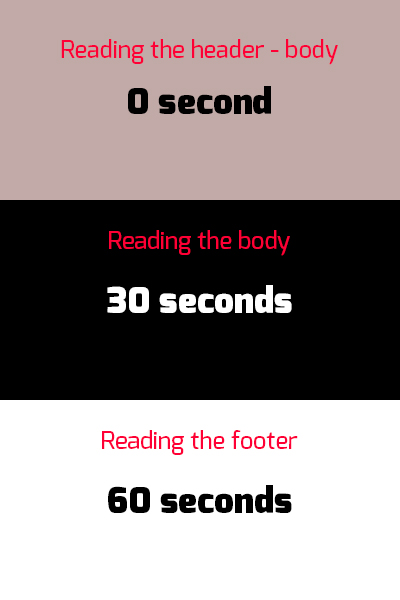
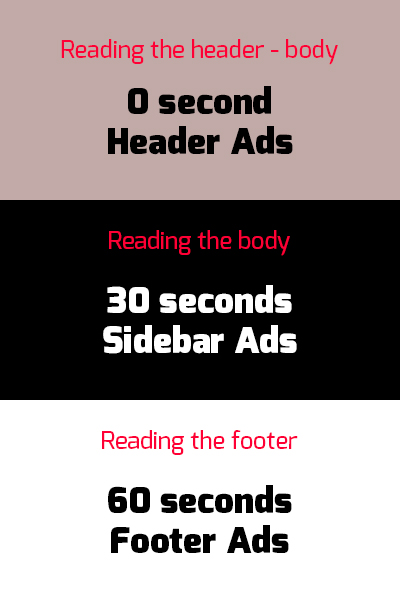
This is the time spent by your reader while reading your article
(The number made for illustration only. Actual time may vary, use a proofreader to get the actual estimation):

And these are the suggested Ads placements:

Both combined:

Look how fast your readers pass through the ads that have been put in these strategic places. Which means, these ads will not give more earnings (except when clicked, this is called with the term call to action). Relying on earnings per thousand impressions it will be difficult in this way. For that, we rely on the duration of impressions.

How to do it? The illustration above supposed to be self-explanatory. But to make sure we do not misunderstand, it’s good if I explain.

The trick is to “intercept” the reader in the area where we have placed the advertisement. This can easily be done using in-feed ads. Right. But it would be easily missed if the reading material does not “intercept” the reader.

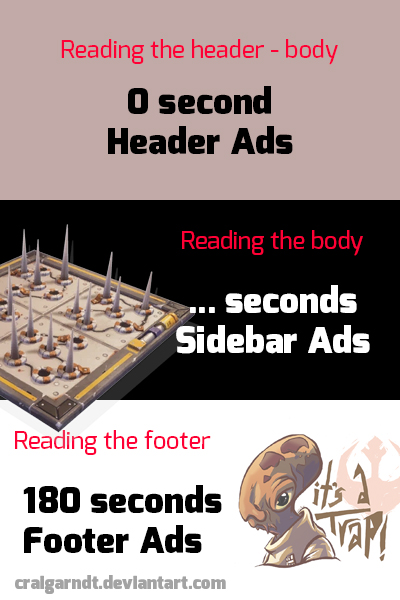
Let me give you another illustration using a modified illustration from above.

This is the time spent by your reader after we put the “traps”. Don’t think anything negative or using creepy stuff, that will only make your reader leave and look for another web to find what they need. Well, unless you have one of a kind website, I think this method will work. But, I still won’t encourage you to do that.

So, what kind of trap is legal for us to use? We can put tutorials, video with certain durations that we can easily ember from YouTube* and other time-consuming things. Such as how to hold breath for 60 seconds while reading and some quizzes. Have you ever been on a website that held a polling without significant result? That’s an example of a good trap. The keyword is “time-consuming”. Hold your reader as long as possible in all of your web pages.

*Also, read how to make your own video website that earns you money.

But make sure the time they spend is beneficial to them!

Google Chrome’s New Rule: Ad Blocking


Google Chrome’s New Rule: Ad Blocking

Again Google issued a controversial decision. Having previously “complicated” the YouTubers by raising requirements to monetize their videos. This time Google is implementing new rules for Google Chrome users.

Read about YouTube hard rule here.

Google Chrome will soon block all ad impressions that are considered annoying, such as the use of auto-play video ads. This is actually a bit ironic considering Google including those who advocate the web browser users to turn off the ad blocker that they use.

For the web maker or service user of AdSense, it has been felt for a long time. Google often recommends that ads are made in harmony with the web they are hosting. In fact, Google also often analyze the ads and our web and then suggest improvements in appearance. For example, preventing stacked ads or ads that have an out-of-theme appearance.

Google’s latest interference with ad creation is the Matched Content system.

The last thing is somewhat confusing to some people because the rule is against Google’s rules that require ads to look like ads. Google intent is, do not let our web visitors stuck with the ads we make as part of our article. For example, I can write this, “click the link below to know more”, but I didn’t know what Google AdSense ads will appear under this post. Meanwhile, web users most likely “fooled” by the instruction when opening the ad.

//pagead2.googlesyndication.com/pagead/js/adsbygoogle.js

(adsbygoogle = window.adsbygoogle || []).push({});

See what I mean?

I myself think this rule is good. That way, the web that has been hard-won by the webmaster will not be “spotted” by bad ads. Web visitors will have a more enjoyable experience on the web and in addition, can also conveniently click on what they need.

And I think this will cause the possibility of web visitors to subscribe or start following.

So, have you followed my web?

Cara membuat Google AdSense cocok konten Unit


Baru-baru ini pagi ini saya bertemu pada pemberitahuan dari Google ketika saya membuka peluang saya pada account Google AdSense. Saya percaya Anda bisa melihat pemberitahuan yang sama seperti saya pada account Google AdSense Anda dengan pergi ke optimasi > peluang. Google AdSense cocok konten Unit bekerja seperti namanya menjelaskan, mengirimkan iklan yang cocok konten Anda.

Itu bukanlah hal yang baru untuk SEO dan SEM aktivis karena ada juga agen iklan lain menawarkan metode iklan yang sama. Bahkan sebelum Google meluncurkan Unit konten ini cocok. Anda dapat melihat beberapa dari mereka di gosip dan perangkat lunak download website. Namun, sebagian besar isi adalah sebagian besar dari TIPUAN untuk beberapa mustahil Lifehack, seperti menjadi kaya dengan satu klik (jika ini benar-benar terjadi, aku akan menulis artikel ini dari planet saya sendiri atau AI beberapa akan menulis ini).

Segala sesuatu yang perlu Anda ketahui tentang AdSense, SEM dan SEO

Meningkatkan penghasilan Anda

Anda juga dapat menampilkan iklan, sehingga Anda mendapatkan uang sementara mempromosikan konten Anda.

Cara yang bagus untuk mempromosikan konten Anda

Konten yang cocok mempromosikan artikel Anda, sehingga pengunjung melihat lebih banyak konten Anda dan tinggal lebih lama di situs Anda.

Lebih halaman dilihat

Penelitian kami menunjukkan bahwa tampilan halaman meningkat 9% rata-rata, dan waktu yang dihabiskan di situs sebesar 10%

Menarik, kanan? Mari kita mulai membuat Unit konten cocok Google AdSense

Untuk membuat cocok konten unit:

  1. Sign in ke account AdSense Anda.
  2. Di panel navigasi di sebelah kiri, klik iklan saya.
  3. Klik + unit iklan baru.
  4. Pilih konten yang cocok.
  5. Menggunakan drop-down di sudut daerah pratinjau untuk melihat mana situs Anda memenuhi syarat untuk Matched konten.
  6. Unit konten Matched Anda memberi nama.
  7. Di bagian "Gaya", mengubah gaya unit konten Matched Anda agar sesuai dengan situs Anda.
  8. Di bagian "Ukuran", Pilih ukuran iklan yang sesuai dengan tata letak Anda.

Baca juga: AdSense di WordPress

Harap dicatat bahwa Anda hanya akan melihat pilihan ini jika web Anda memenuhi syarat untuk Tampilkan Unit iklan ini. Ikuti langkah ini untuk mengetahui:

Untuk memeriksa kelayakan situs Anda:

  1. Sign in ke account AdSense Anda.
  2. Di panel navigasi di sebelah kiri, klik Settings.
  3. Klik situs saya.
  4. Di bawah "Situs saya", klik Matched konten.
    Jika Anda tidak melihat Matched konten di bawah "Saya situs" kemudian Anda tidak sedang memenuhi syarat untuk menggunakan konten Matched.
  5. Pada halaman "Matched konten", periksa untuk melihat jika situs Anda tercantum:
    • Jika situs Anda tercantum, Anda dapat menempatkan unit konten Matched pada salah satu halaman.
    • Jika situs Anda tidak tercantum, maka hal ini tidak sedang memenuhi syarat untuk Matched konten.

Jika setidaknya salah satu dari situs Anda memenuhi syarat, Anda akan melihat pilihan untuk membuat Matched konten unit di bawah tab iklan saya di account Anda.

Google AdSense cocok konten unit juga akan mencakup subdomain. Jadi, jika Anda memiliki Mari kita mengatakan digressingme.cool, maka movies.digressingme.cool akan dimasukkan sebagai salah satu situs yang memenuhi syarat.

Juga, membaca: cara ilegal untuk menipu AdSense

Jika Anda memiliki beberapa situs

Jika Anda penerbit dengan beberapa situs, Anda mungkin menemukan bahwa hanya beberapa situs Anda memenuhi syarat untuk Matched konten. Dalam kasus ini, kami meminta bahwa Anda hanya menempatkan unit Matched konten di situs Anda memenuhi syarat. Jika Anda menempatkan unit Matched konten di situs tidak memenuhi syarat, maka kita tidak akan mampu mengisi unit dengan rekomendasi.

Kesimpulan

Pada dasarnya, Google AdSense cocok konten Unit menawarkan hasil yang sama seperti jika kita menempatkan link internal kami pada artikel. Lihat link "Juga membaca" Aku meletakkan di sini? Namun, hal ini juga memungkinkan Anda untuk uang dari link Anda bukan hanya hanya membuka halaman baru.

Cara ilegal untuk menipu AdSense andIllegal cara untuk menipu AdSense dan pengunjung Anda untuk ganda Anda pendapatan Anda pengunjung untuk mendapatkan pendapatan


Hi guys, sekarang saatnya bagi saya untuk berbagi bagaimana untuk menipu AdSense.

Aku cukup beruntung untuk mengalami hidup di jaman ketika menjadi seorang geek dianggap keren. Orang-orang telah menggunakan berbagai jenis barang rampasan dari waktu ke waktu. Dari barbar pendekatan pendekatan yang materialistik. Tapi sekarang (saya pikir)… kami dapat terkesan orang hanya dengan presentasi. Presentasi datang pertama, prestasi dan memperbaiki datang kemudian. Seperti Google bagaimana hal itu.

Juga, membaca Google AdSense cocok konten Unit

Sekarang, kembali ke topik

Mari kita lihat video di bawah ini. Jika Anda tidak suka menonton, Anda dapat melewatkan video karena aku akan menulis segala sesuatu setelah video.

https://youtu.be/UUCA7kgiVv8

Langkah demi langkah instruksi

Ini adalah langkah demi langkah instruksi. Jadi pastikan Anda melakukannya langkah demi langkah dan tidak secara acak (kecuali lain).

Amazon (atau program afiliasi lainnya)

  1. Membuat account afiliasi gratis (saya menggunakan Amazon, tetapi Anda dapat menggunakan metode ini dengan akun).
  2. Pergi ke tab afiliasi (up-kiri di Amazon).
  3. Mencari promosi tersedia untuk Anda.

Di AdSense

Anda harus memiliki account AdSense disetujui!

  1. Membuat unit iklan di ukuran kode iklan Amazon.
  2. Membuka unit iklan dan kemudian gulir ke bawah ke mana itu menyatakan sesuatu seperti, "jika tidak ada iklan yang tersedia *"
  3. Sisipkan Amazon-kode iklan sana dan mengganti bagian sebelum / / dengan https: dalam kode Anda diposting.
  4. Menghapus bagian setelah nama Amazon Anda (saya digressingme-20)
  5. Menyimpan pengaturan dan kemudian klik "Dapatkan kode" dari unit iklan yang baru Anda buat.

Dalam situs web Anda

  1. Bagian terakhir ini sederhana. Hanya paste kode ke dalam penempatan iklan atau di mana saja Anda ingin untuk muncul. Saya sarankan tinggal jauh dari editor penampilan WordPress dan tetap dengan penempatan widget yang disediakan oleh tema Anda.

Bagaimana cara kerjanya?

Kode iklan Anda dimasukkan ke dalam penempatan/widget Anda seharusnya untuk menunjukkan iklan Google AdSense hanya. Kadang-kadang, traffic web Anda akan turun dan Google "menolak" untuk menempatkan iklan di situs web Anda. Oleh karena itu, daerah kuning kosong. Anda dapat mengubah warna daerah kosong, tapi… kosong masih kosong.

Itu sebabnya kita mengisi kosong dengan iklan lain yang Anda buat di Amazon.

  1. Jika web Anda memiliki lalu lintas yang baik, maka Anda mungkin perlu metode ini agar Anda terlihat tata letak baik (tidak kosong daerah, aneh mewarnai dll). Bayangkan situs web Anda seperti sebuah toko 24hrs sekarang!
  2. Jika Anda baru saja mulai web Anda, kemudian menggunakan metode ini akan memungkinkan web Anda terlihat seperti itu sudah diisi dengan Google AdSense. Jadi itu akan memberikan konten yang kaya.

Yah, kurasa itu adalah cara untuk menipu AdSense untuk sekarang… siapapun memiliki sesuatu untuk ditambahkan?

SEO dan SEM

Google AdSense, AdWords, SEO dan SEM


Barusan gw habis baca banyak soal bagaimana meningkatkan penghasilan dari Adsense. Dari sekian banyak halaman yang gw baca, gw nemu satu yang paling kena di hati… tsaah… Yaitu tulisan di Klikmania yang bisa gw kutip di bawah ini:

Sudah itu saja, jangan berpikir yang lain-lain. Yang dipikirkan adalah bagaimana hari ini menulis dan bagaimana besok menulis konten. Simpel kan….

Ya sebetulnya gak simpel juga sih, secara gw gak nemu jawaban pastinya di web ini. Tapi web ini berhasil membesarkan hati gw buat terus menulis hahaha…

Lantas gw nemu web lain yang ngebahas soal Adsense secara lebih dalam dan ruwet. Mungkin otak gw aja yang udah kelamaan gak dikasih oli, tapi kok gw gak nyambung ya?

Rata-rata web yang gw baca itu nunjukin trik meningkatkan penghasilan dari Adsense, sayangnya beberapa link yang dikasih dari web itu udah gak berfungsi lagi. Lantas gw melanjutkan cari tahu soal ini di Google dan nemuin tool gratis di bawah ini:

SEMrush

Apa Itu SEM?

Lah, urusan SEO (Search Engine Optimization) aja belum beres malah harus urusin SEM (Search Engine Marketing)? Apa pula itu SEM? Gw nemuin web bagus tentang hal ini di sini. Menurut web IM CODE, SEM adalah pemasaran yang didapat dengan cara membayar agar tampil di Search Engine. Ini pernah gw rasain waktu gw mau ngiklanin salah satu web gw supaya muncul di Google.

Kenapa harus bayar kalau bisa gratis? Kita memang bisa bergantung pada SEO kalau konten yang kita tulis di web kita termasuk Blog atau Niche yang isinya memang menunjang buat SEO. Sementara kalau kita punya web yang isinya untuk ngiklanin bengkel motor, gak mungkin juga kita berlebay-lebay nulis artikel panjang-panjang cuma buat ngasih tahu pelanggan bahwa kita sekarang lagi jualan busi. Di sinilah kita butuh SEM. Kecuali kalau bengkel motorlu udah sekelas Auto 9000 misalnya.

Tapi ada juga yang menggabungkan SEM dengan SEO, seperti yang dilakukan media hiburan dan berita. Kita bisa lihat iklannya di media lain, dan mereka juga nongol di mesin pencari saat kita nyari artikel tertentu. Wah, kayanya asik ya kalau sudah bisa gabungin dua cara ini. Gw sih belum mampu. Walaupun Google AdWords udah mengiming-imingi bonus Rp. 450 ribu (atau 150 rb) kalau gw masang iklan lagi.