
AdWords is the best tool for SEM since its fully integrated with AdSense. We can use AdWords feature such as AdWords keyword planner for free to work on our SEO. We will cover this at the end of our topic below. So we can get right into the action. The use itself quite intimidating and confusing if you want to unlock its full potential. For now, let’s make a new Google mail account and do this making new AdWords account process. We have to think as both advertiser and publisher (in my case, blogger) in order to use AdWords properly.
Read this first if you’re not familiar with SEM V SEO.
You can only use one Google account to use Google service, but you can invite other users later.
For Search Engine Marketing (SEM)
- Make a new Google account (or use your existing Gmail)
- Start your AdWords by signing in with your Google account here
- You can see the warning saying something like “balance is exhausted”. That’s because we haven’t put any deposit on AdWords yet.
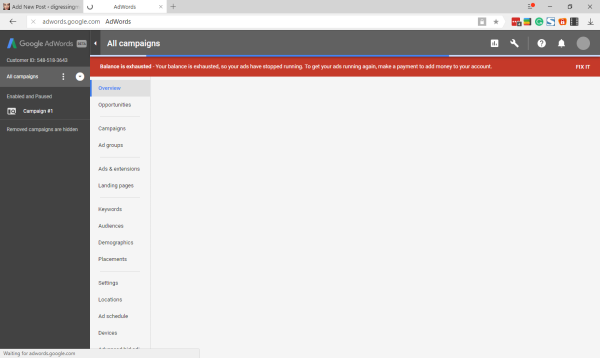
- Click Fix It and fill the next page with your information.
- Go to Opportunities > Setup Up A Campaign
- Pick the type of Campaign that suits you, most probably is the Search type
- Choose website traffic
The website traffic goal recommends settings and features to help you drive relevant customers to your website
- Enter your website URL under “Select the ways you’d like to reach your goal”
- Continue
- Name your campaign, be brief
- Set your international targeting, language, and budget
- Choose the standard delivery method for this test. You can set to accelerated when you’re familiar with your website traffic
- Set your start and end dates
- Open more options
- Set Dynamic Search Ads
- Continue and Set Up Ad Groups
- Choose URL and fill with your website URL
- Save and Continue to Create Ads and Add new ads
- Fill your Ad description and Check your Ad preview
-
Congratulations! Your campaign is ready.
That’s it. The next thing you have to do is making the deposit to make your Ad running.
For Search Engine Optimization (SEO)
We can also use AdWords for free. Just click the wrench tool button on the top right of the screen. Then go to Planning > Keyword Planner. Let’s put something you can think of that’s related to your website. If you’re making a website about toys, you can try putting it there.
- Now see the Avg. Monthly Searches and click it to show the list ordered from the most used to the least used.
- Look for the first “Low” in the competition part and look what that Low stands for. And that’s the keyword you might want to use for your next article.
See you and don’t forget to subscribe to my YouTube channel. That’s the least you can do. 🙂
 bipolar is-popular_