Here Is Why Crouton Is So Awesome on My Chromebook


Here Is Why Crouton Is So Awesome on My Chromebook

I used Crouton to install Linux on my Chromebook, and I’m using it again as I write this article. The installation is running on another tab of the Chrome web browser I’m using to write now. Here Is Why Crouton Is So Awesome on My Chromebook:

Also, read Earlier Crouton installation.

What Is Crouton?

Crouton is the acronym of Chromium OS Universal Chroot Environment. It is a set of scripts that bundle up into an easy-to-use, Chromium OS-centric chroot generator. Thre fore it allows us to install Linux within the Chrome and run it after. So, Chroot means CHromium ROOTs(?).

Installing Crouton

Installing Crouton itself is easy as long as you have all the sources. And like I mentioned earlier, it’s running on the same web browser I’m currently using. So, reading your reference as it’s installing will be very easy.

But, turning your Chromebook to developer mode is quite tricky and boring. So, please be patient with this process, ’cause I almost slam my Chromebook to the wall for my lack of knowledge and patience.

You can read the step by step tutorial here and then come back here to install other OS (I was using Gallium on that page).

Or, you can continue by following these steps (after making your Chromebook in developer mode):

  1. First, you will have to download Crouton.
  2. Then press ctrl + alt + T to open the new tab
  3. Type shell on the Terminal
  4. The prompt will be Chronoslocalhost
  5. Type  sudo sh ~/Downloads/crouton -t keyboard,extension,unity -r trusty -n unitytrusty
  6. Just wait until the installation finished and don’t close the tab!
  7. In the end, enter your username and set your password (twice). Pay attention to “twice”, it means you have to enter the same password two times.
  8. After it’s done, you can start using your Linux unity by typing sudo startunity on the terminal.
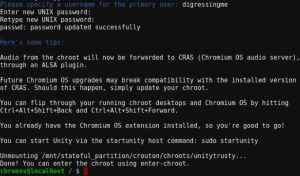
Why Crouton Is So Awesome on My Chromebook?

If what I’ve just explained to you is still not enough, what if I tell you that:

  • I can easily install other Linux using the same process only by writing different command line.
  • I don’t have to risk my data by accidentally formatting my drive.
  • I can cycle through Chromium OS and your running graphical chroots using Ctrl+Alt+Shift+Back and Ctrl+Alt+Shift+Forward.
  • Chrome OS and Linux installed by Crouton can share the same clipboard.

Great sources: https://gist.github.com/garthvh/07805317032ce7d55887

Status

Chromium 64bit for MacOSX


I was browsing for the solution for my failing Neon installation when I found Chromium 64bit for MacOSX at chromium.wolyss.com.

Chromium vs Google Chrome

In 2008, Google created a project using embryonic source code from Chromium. After that Google broke away from Chromium and continued the development of Chrome.

However, Chromium is not a dormant project, as its developers continue to open Chromium projects and are named Chromium projects.

Google provides automatic update feature and also embedded the media player in it. After that Google also put Chrome into the laptop market, with a product called Chromebook.

Read more history of Chromebook, Chromebit, Chromebase, and Chromebox.

Google also added file formats that can be run by Chrome and also drivers for hardware that is made in closed-source. For me, the fatal difference is the absence of Flash Player in Chromium. But that can be solved using this way.

Chromium browser has:

  • only open-source licenses (BSD license, MIT license, LGPL, MS-PL and MPL/GPL/LGPL tri-licensed code) plus unlicensed files. It is a FOSSproject. A full list of software developed by third-parties is available within the browser at chrome://credits (similar to this online page)
  • a blue-colored logo
  • the similar sandbox as Google Chrome (For info, Firefox also uses it)
  • the similar user interface and settings as Google Chrome
  • the similar support for Extensions, Themes and Web Apps as Google Chrome
  • the similar user agent as Google Chrome
  • the built-in Chrome PDF Viewer (known as PDFium), on Windows OS
  • the built-in Chromoting Viewer (To use it, you need to first install the Chrome Remote Desktop app)
  • the built-in Google Native Client
  • the built-in Print preview and print system
  • no stable version offered by the official team (aka The Chromium Authors)
  • no digital signature
  • no auto-update system (Solutions: Use an #updater • Use PPA on #linux)
  • no Google API keys (Solution: Check #google-API-keys)
  • no built-in Flash player (Solution: Check #flash)
  • no support of proprietary codecs (AAC, MP3, H.264) (Solution: Check #html5-audio-video)
  • no user RLZ identifier
  • no user metrics (usage statistics) (opt-in option)
  • no crash report (opt-in option)
  • More details on the official site focused on Linux.

Some developers maintain forks of Chromium that offer more features and enhancements. Thanks a lot to developers! 😉

And if you want to follow new Chromium features, check the Google+ posts of the Chromium Evangelist at Google

To install it, double-click on Chromium_OSX.dmg file you have downloaded. Then drag its icon on Applications folder. You may then “Eject” and throw away this disk image.

Get Chromium for MacOSX here or perhaps you want to install Windows on your Chromebook?

Chrome Exceeding Chromium In:

  • Is compiled, linked and packaged into an installer
  • Has an auto-update system (some, such as the Debian or Ubuntu community builds of Chromium, rely on the package management system of the OS as an alternative)
  • Has an integrated PPAPI version of Adobe Flash Player.[10] This can be downloaded and installed separately in Chromium.
  • Has licensed media codecs to support the patent-encumbered H.264 and AAC formats. These can be downloaded and installed separately in Chromium. By default, Chromium only supports VorbisMP3Theora and WebM formats for the HTML5 Audio and HTML5 video tags.[11] Due to the way Chromium implements support for media formats, it is difficult to split up codecs to ship legally dangerous ones from ones that are safe to ship without paying for patent licenses. It relies on an FFmpeg-based library that contains the codecs with which it was built, instead of modularizing them into a plug-in based system like GStreamer does. Because of this, Fedora ships the library containing legally safe codecs but allows for the user to install a “Freeworld” package from somewhere else (RPM Fusion, for example) to override the default library, so that users who live where software patents don’t apply can make full use of Chromium.
  • Supports Widevine, a digital rights management (DRM) module. A dummy package that doesn’t enable Widevine support is built by default for Chromium.[12]
  • Disables extensions not hosted on the Chrome Web Store for macOS and Windows users on all Chrome channels[13]
  • Bears the Google and Google Chrome brand names and logos, both of which are registered trademarks[14][15][16]
  • Features an opt-in option for users to send Google their usage statistics and crash reports
  • Implements RLZ tracking when Chrome is downloaded as part of marketing promotions and distribution partnerships. This transmits information in encoded form to Google, including both when and from where Chrome was downloaded. In June 2010, Google confirmed that the RLZ tracking token is not present in Chromium or Chrome versions downloaded from the Google website directly. The RLZ source code was also made open-source at the same time, so that developers can confirm what it is and how it works.[17]
  • Licensed as freeware, as opposed to free and open-source[18]

Sejarah Chromebook, Chromebox, Chromebase dan Chromebit


Gak kerasa udah dua bulan aja sejak pertama kali gw pakai Chromebook. Chromebook yang gw dapetin sebagai hadiah ulang tahun ini gak pernah sekalipun mengecewakan gw baik dalam menjalankan tugasnya, maupun setelah gw siksa dengan instalin ini-itu seperti Gallium, Endless OS dan Ubuntu. Dan gak jarang juga gw bongkar cuma buat senang-senang. Hebatnya, dia selalu kembali pulih seperti sedia kala. Lantas, di pagi habis begadang gara-gara ngedit video ini, gw baru nyadar kalau gw tuh gak tahu apa-apa soal latar belakang dan sejarah Chromebook ini. Kalau ternyata dia bukan dari kalangan baik-baik gimana? Terus malam-malam gw dicekik waktu tidur. Serem kan?

Maka mulailah gw melakukan pemburuan info soal Chromebook ini, karena kebetulan trending topik hari ini gak ada yang gw ngerti. :p

Apa Itu Chromebook, Chromebox, Chromebase dan Chromebit?

Sederhananya sih begini… Chromebook itu laptop, Chromebok itu desktop, Chromebase itu all-in-one dan Chromebit itu mirip sama Intel Compute stick. Cara pemakaiannya pun sama, yaitu dicolok ke layar display yang memiliki input HDMI.

Hasil gambar untuk asus chromebit cs10

Asus Chromebit CS10

Hasil gambar untuk Acer Chromebox CXI-QB2957U - Intel 2957U - 2GB - Hitam

Acer Chromebox CXI-QB2957U – Intel 2957U – 2GB – Hitam

Sejarah Chromebook dan Saudara-Saudaranya

Chromebook adalah laptop yang menjalankan sistem operasi Chrome yang berbasis Linux. Ini makanya Chromebook bisa diinstalin Linux dengan mengaktifkan developer mode, baik dengan crouton (diinstal melalui command line di dalam ChromeOS) atau untuk dipakai secara dual-boot.

Pada bulan Desember 2010, Google membagikan 60rb laptop buatan Inventec berseri Cr-48 yang berisi Chromium secara cuma-cuma untuk testing. Para tester ini disebut dengan pilot uji coba Cr-48. Padahal 60rb itu banyak, kok gw gak kebagian ya?

Google membuat gebrakan dengan merubah desain keyboard konvensional menjadi lebih pas untuk pemakai Chromebook yang notabene mayoritas kegiatannya berada seputar internet. Perubahan itu adalah mengubah capslock jadi tombol pencari dan tombol Function jadi tombol back-forward-refresh-dan seterusnya.

Mungkin yang hobi ngoprek ingat kalau laptop apapun bisa disulap jadi Chromebook. Cara itu adalah dengan menginstal Chromium ke dalam laptop jadul. Chromium sendiri sekarang sudah berjalan sendiri di luar ChromeOS dan karena open source bisa dikembangkan secara bebas (kalau ngerti), misalnya dipakai oleh PhoenixOS.

Chromebook Seri High-End

Kalau habis baca ini kesannya Chromebook itu buat rakyat jelata, coba tengok Pixel yang dikeluarin sama Google tahun 2013. Dengan spesifikasi yang tinggi dan harga yang bikin mau nabung, gak terlalu rakyat jelata lagi kan?

amzn_assoc_placement = “adunit0”;
amzn_assoc_search_bar = “true”;
amzn_assoc_tracking_id = “digressingme-20”;
amzn_assoc_ad_mode = “manual”;
amzn_assoc_ad_type = “smart”;
amzn_assoc_marketplace = “amazon”;
amzn_assoc_region = “US”;
amzn_assoc_title = “Keluarga Chromebook Pixel”;
amzn_assoc_linkid = “d39b0ada012a80f89d4c05253a2392a0”;
amzn_assoc_asins = “B075JSK7TR,B075JS8NZ7,B00CGQ07RM,B00BM7Y7DQ”;

//z-na.amazon-adsystem.com/widgets/onejs?MarketPlace=US

Chromebook ngejalanin nyaris semua aktifitas dan aplikasinya di cloud alias secara online, walaupun ada beberapa yang bisa digunakan secara offline. Jadi kaya kita jalanin komputer orang secara remote aja. Tapi ya hari gini gak online, rasanya kaya apa gitu ya? Ini yang bikin Chromebook gak perlu spek yang tinggi-tinggi. Pokoknya asal ada wifi kenceng, lanjut idup lo.

Kekurangan dari hal ini adalah, kita gak bisa lagi tuh yang namanya nginstallin perangkat kesayangan kita. Anggaplah kita punya webcam kesayangan atau pernak-pernik lainnya yang memakai koneksi USB. Kalau gak disupport, ya jadi pajangan aja deh. Atau ya install Linux dan aktifin dari situ.

Tapi makin ke sini, makin banyak peripheral yang disupport sama ChromeOS, kecuali printer. Karena kayaknya sih doi mau mengedepankan Google cloud print yang setelah gw coba gak mengecewakan juga.

Kelahiran Chromebox dan Chromebase

Chromebook jadi laptop Linux dengan penjualan tertinggi. Di tahun 2012 Google meluncurkan Chromebox, versi desktop dari Chromebook. Disusul dengan peluncuran Chromebase di tahun 2014. Kalau pernah lihat komputer yang bentuknya kaya iMac tapi bukan iMac, itulah Chromebase.

amzn_assoc_placement = “adunit0”;
amzn_assoc_tracking_id = “digressingme-20”;
amzn_assoc_ad_mode = “manual”;
amzn_assoc_ad_type = “smart”;
amzn_assoc_marketplace = “amazon”;
amzn_assoc_region = “US”;
amzn_assoc_linkid = “d8331293b386ad24d2e597883326f815”;
amzn_assoc_design = “in_content”;
amzn_assoc_asins = “B01G26U492,B01IA7QHYM”;

//z-na.amazon-adsystem.com/widgets/onejs?MarketPlace=US

Android

Google telah menjanjikan untuk memberikan update pada Chromebook tipe lama (tertentu) agar bisa menjalankan aplikasi Android di Chromebook. Namun sampai saat ini masih banyak yang belum kebagian jatah (termasuk gw).

Sempat beredar tutorial untuk menjalankan Android di Chromebook dengan cara membuat extension dan mengkonvert apk, namun ternyata itu hanya sementara. Hilang begitu saja ketika Chrome mengupdate.

Google sendiri tidak tertarik untuk menjadikan Android sebagai mesin desktop dan mau lebih berkonsentrasi pada ChromeOS. Apa alasannya? Hanya dia dan sopir bajaj yang tahu.

Android convertibles — basically tablets with a keyboard accessory — make some sense. But Android desktops don’t make much sense right now. Even Google doesn’t’ think Android is appropriate for desktops or laptops, which is why they’re pushing Chrome OS-based desktops and laptop PCs. ~ howtogeek.com

Sedikit Gimmick

Google menargetkan pemakai komputer pemula dan pelajar sebagai pasar Chromebook. Namun ternyata hal ini menimbulkan kasus karena menurut EFF(Electronic Frontier Foundation), Google telah melanggar privasi melalui kebijakannya mengenai cookies dan sinkronisasi. Sehingga keluar pernyataan bahwa pelajar tidak boleh diperah informasinya, dan apabila boleh, harus sepengetahuan orangtuanya.

Chromebook history, Chromebox, Chromebase and Chromebit


GAK kerasa udah aja two months since I first wear Chromebook. Chromebook I dapetin as birthday gift is not never disappoint me either in the exercise of his duties, and after My torment with instalin — it’s like Gallium, Endless OS and Ubuntu. And not infrequently I also uninstall just make happy-happy. Amazingly, she recovered like always on hand. Then, on the morning run out staying up because for this video, my new nyadar if I gak tuh know anything reserved Chromebook background and history. If it turns out he’s not from among well gimana? Keep those nights I strangled bedtime. Serem right?

Then start I did hunt info reserved Chromebook, because it happens to be a trending topic today is not there that I understand. :p

Also read: Chrome OS for PC and Mac

What is a Chromebox, Chromebase, Chromebooks and Chromebit?

Simply put, anyway here goes … Chromebook that laptop, desktop, it Chromebox Chromebase it all-in-one and Chromebit it is similar to the same Intel Compute stick. How to use any of the same, i.e. it is plugged into the display screen that has an HDMI input.

Image results for asus chromebit cs10

Asus Chromebit CS10

Image results for Acer Chromebox CXI-QB2957U-Intel 2957U-2 GB-Black

Chromebox CXI Acer-Intel-2957U QB2957U-2 GB-Black

History of Chromebook and his brothers

Chromebook is a laptop running the Chrome operating system is Linux-based. This is why Chromebook can diinstalin Linux with enable developer mode, either with croutons (installed via command line in ChromeOS) or for use in dual-boot.

In December 2010, Google distributed a homemade laptop Inventec 60rb series Cr-48 containing Chromium free of charge for testing. The tester is called with test pilot Cr-48. But it was a lot 60rb, kok gak I goto huh? Google makes an impact by changing the conventional keyboard designs to be more fitting for the wearer Chromebook that in fact the majority of its activities are located around the internet. That change is change the capslock button and search button so Function so the back button-forward-refresh-and so on. Maybe the hobby ngoprek remember if any laptop can be transformed so Chromebook. That way is to install Chromium into the traditional laptop. Chromium itself is now running on its own outside of ChromeOS and because open source can be developed freely (if understood), for example was used by PhoenixOS.

Chromebook High-end Series

If it runs out read this effect that create Chromebook commoners, try check out dikeluarin the same Pixel Google year 2013. With a high specification and price that makes want nabung, not too common people again right?

amzn_assoc_placement = “adunit0”;
amzn_assoc_search_bar = “true”;
amzn_assoc_tracking_id = “digressingme-20”;
amzn_assoc_ad_mode = “manual”;
amzn_assoc_ad_type = “smart”;
amzn_assoc_marketplace = “amazon”;
amzn_assoc_region = “US”;
amzn_assoc_title = “Keluarga Chromebook Pixel”;
amzn_assoc_linkid = “d39b0ada012a80f89d4c05253a2392a0”;
amzn_assoc_asins = “B075JSK7TR,B075JS8NZ7,B00CGQ07RM,B00BM7Y7DQ”;

//z-na.amazon-adsystem.com/widgets/onejs?MarketPlace=US

Chromebook ngejalanin almost all activities and its application in the cloud a.k.a. online, although there are some that can be used offline. So we jalanin rich computer guy remotely wrote. But yes the day gini not online, it feels rich what gitu ya? This is what makes the spec need not Chromebook high. Anyway there is wifi kenceng origin, further idup lo.

Lack of this is, we can not again tuh nginstallin whose name our favorite devices. Suppose we have a webcam or other cherished trinkets using the USB connection. If not supported, so the post aja deh. Or Yes to install Linux and aktifin from there.

But it gets worse here, the more peripheral ones are supported the same ChromeOS, except the printer. Because I think the hell doi want to put forward the Google cloud print after I try not to disappoint as well.

The birth of Chromebox and Chromebase

Chromebook so laptop Linux with the highest sales. In the year 2012, Chromebox Google launched desktop version of Chromebook. Followed by the launch of Chromebase in the year 2014. If ever see a computer shape is rich but not the iMac iMac, that’s Chromebase.

amzn_assoc_placement = “adunit0”;
amzn_assoc_tracking_id = “digressingme-20”;
amzn_assoc_ad_mode = “manual”;
amzn_assoc_ad_type = “smart”;
amzn_assoc_marketplace = “amazon”;
amzn_assoc_region = “US”;
amzn_assoc_linkid = “d8331293b386ad24d2e597883326f815”;
amzn_assoc_design = “in_content”;
amzn_assoc_asins = “B01G26U492,B01IA7QHYM”;

//z-na.amazon-adsystem.com/widgets/onejs?MarketPlace=US

Android

Google has promised to give an update on the old type Chromebook (certain) to be able to run Android applications in Chromebook. However, until now there are still many who have not receive rations (including me).

Had outstanding tutorial to run Android on Chromebook with how to make extension and mengkonvert apk, but it turns out it’s only temporary. Lost it when Chrome update.

Google itself is not interested in making the Android as a desktop machine and want to concentrate more on ChromeOS. What is the reason? Only he and the driver of the rickshaw knows.

Convertibles — basically Android tablets with a keyboard accessory — make some sense. But Android desktops don’t make much sense right now. Even Google doesn’t ‘ think Android is appropriate for desktops or laptops, which is why they’re pushing Chrome OS-based desktops and laptop PCs. ~ howtogeek.com

A Bit Of A Gimmick

Google’s target users computer beginners and students as the Chromebook market. But it turns out that this raises the case because according to the EFF (Electronic Frontier Foundation), Google has broken through its policies regarding cookies privacy and synchronization. So out the statement that students should not be milked information, and in may, should the knowledge of his parents.

Cara Bikin Macbook Air Jadul (2009) Keren Lagi


Kalo lu punya waktu panjang, gw ga bakal langsung bahas cara bikin Macbook Air jadul (2009) keren lagi. Tapi gw bakal ceritain dulu kenapa gw beli ini… Nah, jadi ga penasaran kan?

Awal gw liat unit ini, gw cuma mikir satu kata, “mewah!”

Gimana ga mewah? Bagian dari seperangkat alat gaya yang fungsinya ga ngelebihin netbook harganya bisa beda tipis sama iMac yg gw pake buat banting tulang maen Zuma!?!

Fungsinya dulu…ya gitu2 aja. Apalagi sekarang? Tapi ada yg abadi dari unit ini, yaitu tongkrongannya. Beli Macbook Air, casingin yg cakep terus nongkrong sok menikmati suasana di cafe, jangan lupa bawa kamera digital kaya Nex-5, biar retro gitu.

Nah, sekarang ke bagian tipsnya! Ada beberapa metode yang bisa lu coba:

1. Metode Pertama : Striped Raid

Yang lu butuhin adalah :

  1. 1 atau lebih ssd 1.8 inch
  2. Obang kembeng
  3. Cabang usb merk Orico
  4. Hdd docking Orico juga
  5. 1 atau lebih flashdisk yg rada gedean

Eh…obeng kembangnya ga usah ding. Tadinya gw mau ganti hdd yg di dalem, taunya gagal gara2 yg gw beli tuh ssd 1.8 buat IBM.

Ga usah gw ulang kan daftar kebutuhannya? Tinggal lu apus.

Yang mau kita lakukan adalah… Tancapkan semua flashdisk dan docking hdd (beserta ssdnya) ke lobang usb Orico, terus tancepin ke port usb Macbook Air yang cuman 1. Baru sadar ya kenapa butuh beli Orico?

Selanjutnya kita bakal ngikutin langkah-langkah bikin RAID.

  1. Pencet command dan spacebar
  2. Ketik diskutil
  3. Disc Utility terbuka
  4. Pilih ssd yang ada di kiri
  5. Pilih tab RAID
  6. Beri nama RAIDnya, pilih striped
  7. Tarik flashdisk ke bawah pilihan tadi
  8. Pilih tombol bikinnya.
  9. Nama RAIDlu bakal muncul di desktop
  10. Iseng restart
  11. Jajal aplikasi yang biasanya berat

Berhasil kan? Macbook Air kamu jadi keren lagi.

Sambil bawa2 sebanyak ini ke kafe? Lu malu? Ini style steampunk maaaan!

2. Metode Kedua : Langsung ganti hardisk

Kalo lu termasuk yang beruntung bisa dapetin SSD 1.8″ buat Macbook Air, rekomendasi gw sih yang OWC AORA, lu tinggal kopi datalu pake Carbon Copy Cloner terus pasang kopiannya ke Macbook Airlu.

Begitu distart, lu masuk ke sistem sama persis sama punyalu. Tapi jauh lebih ngebut!

3. Metode Ketiga : Instalin Chrome Os Cloudready Neverware (Failed!)


Gw ga rekomen metode ini, lantaran Macbook Air 2009 ini ga bisa detect wifi. Tau sendiri kan kalo Chromebook tanpa internet itu lebih ga berguna daripada pasak dalam tempurung?

Tapi kalo lu bisa aktifin wifinya, gw pengen banget tau!

Sebagai solusi penghiburnya, gw installin Windows 7 Ultimate, installin drivernya dari Bootcamp yang bisa lu download gratis, dan ga gw instalin aplikasi apa-apa kecuali Google Chrome. Jadilah Chromebook jadi-jadian.

4. Metode Keempat : Tukar tambah sama yang baru.

Gampang kok caranya, tinggal masukin ke toko-toko online aja. Tapi yang jujur ya, soalnya sekarang banyak penipu. Jadi penjual jujur kaya kita kena imbasnya… Dulu juga banyak sih.

5. Cobain installin MACOSX Lion 32bit. Gw udah coba, dengan cara yang ga ribet juga. Hasilnyas Macbook Air lebih lumayanlah dipakenya.