Deeper About Deepin OS 15.5 (What’s New in Feb 2018 Update)


There are some new things happening with Deepin OS 15.5. We can get new Deepin tool and new Deepin updates. And now, we’re also going to learn more about Deepin OS and what makes it the best looking Linux distro, even better than my favorite elementary and Pop OS! You know how cool those two are, right?

Also, read about two of my other favorite Linux: elementary and Pop.

Let’s Start With New Deepin Tool
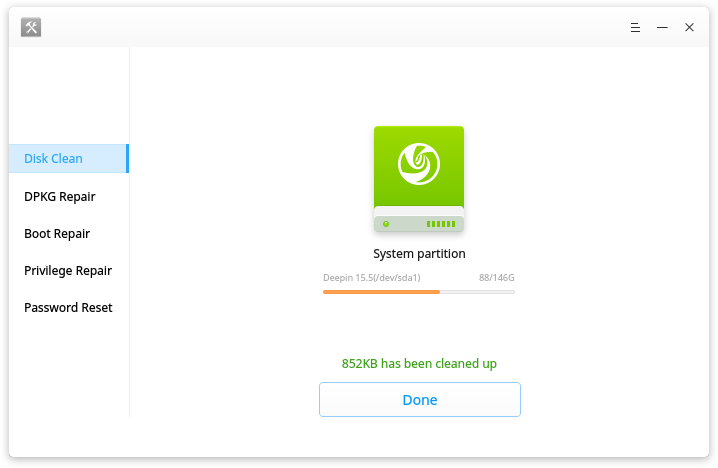
Deepin OS 15.5

Installing Deepin and using it is very easy even for a no-brainer like me. Thank’s for its striking design and intuitive GUI which aims to provide an elegant, user-friendly and reliable operating system. And that even gets easier by the presence of new deepin repair tool, that we can use for, well… repairing deepin.

Let’s watch Deepin repair Tools in action:

Deepin Repair is a tool to help users quickly fix some issues in deepin, including:

  • boot repairing
  • hard disk detecting
  • disk cleaning
  • DPKG repairing
  • privilege repairing
  • password reset.

Deepin Repair can run on both deepin Live system and the real environment.  When you can’t find boot menu, have privilege error or forgot login password, you can’t enter deepin desktop. That’s when you need to go into a Live system at first to run Deepin Repair. Sounds hassle-free, right?

Also, read about Deepin and Upin.

Deepin 15.5 Update

Background of What Deepin Is

The development of Deepin started in 2004 at a fast rate by Wuhan Deepin Technology Co., Ltd, a Chinese company. Debian is used as Deepin base while its previous versions (pre-Deepin OS15.5) based on Ubuntu.

Its desktop environment called DDE (Deepin Desktop Environment) which is based on the Qt 5 toolkit. Its home-grown applications, like Deepin Software Centre, DMusic and DPlayer and now Deepin Repair are tailored to the “average” user.

If you happen to feel familiar with the description above, perhaps because you’ve used it before when it’s called Linux Deepin, Hiweed GNU/Linux. Ring a bell?

Also, read about previous Deepin review.

What’s included in the last update:

  • DTK to version 2.0.6.1-1 fixed the issue that no “Help” entry to view manual;
  • Deepin Boot Maker to version 2.0.4.3-1, fixed the issue that it cannot start in live system;
  • Deepin Repair to version 1.0.1-1, fixed the issue that no icon shows for the directory.

Let’s watch the video below:

It is amazing to see popular Linux sites come out with lists of “best distros” and keep missing on Deepin and Manjaro. It feels like they don’t want the public to know about those. In the case of deepin, as I already read, THIS by far is the best Linux distribution I have ever tried, Extremely user-friendly, beautifully design and countless options when it comes to utilities. My only complaint with it is that the software versions on the app-market always run little behind to pretty much everybody. I had every possible thing I can think of when I installed it, everything native and available on my first run. “CROSSOVER” is a life saver. – deepin user.

Download the latest deepin OS by sharing the link below:

[sociallocker]

Get deepin OS here.

[/sociallocker]

Thank you for reading Deepin OS 15.5, I will keep the info about Deepin OS updated. Make sure you click the notification button on the lower right of your screen if you haven’t done so.

Linux Deepin Reviews and Why It Is Better Than Elementary and Pop OS Pt.2


So, in previous Linux Deepin reviews article, I talked about the first experience I had installing it. Now we’ll continue into what makes it better than elementary and Pop. Don’t get me wrong, both are my first two favorite Linux distros. But there will always be on standing taller than the others, right?

Linux Deepin Reviews: Shop

In Elementary, we’re equipped with a software center where the unwritten rule is: If it’s not there, then it won’t work. So, I’ll have to sit and wait what the developers feed me later.

In Pop, we can do some “tweaking” using the command line, but the option is limited. It’s like “do at your own risk” thing.

Also, read about Pop OS here.

In Deepin Store… (inhale) we can find many apps provided by Deepin or y other developers. I haven’t tested them all, but most of them work just fine. The store design is so slick and intuitive. The apps come with screenshots. The icons fit the theme well. No wonder, Deepin has the best icons collection used by many other Linux distro’s users.

And… it has Crossover installed that allows me to run most Windows apps games.

System Setting and Launcher

Needless to say, Deepin has the best system setting called Control Panel. Without trying to copy Mac’s or Window’s looks, it’s presented to us in a way with Android feels. Somehow it reminds me of Phoenix OS.

So does the launcher, there are some options that we can choose to use the launcher according to our likes (Ubuntu, Mac or Windows).

Enough said, let’s watch the video to see how it looks:

So, what do you think after watching Linux Deepin review video? Is it debatable that it’s better than Elementary and Pop?

Or you want to know even more about deepin? Click here.

Aside

Ubuntu Studio For First Time User


I’ve been using Ubuntu Studio since I decided to run Ubuntu along-side my MacOSX and Chrome OS (yes, that’s possible). Kinda late actually since everyone else in the world has tested Ubuntu at least once in their life. So, I guess I’m not too late to try this. Or may I say that I’m actually just at the right time to test a Linux myself? The Linux my friends use looked crappy and ugly. Sounds harsh, but you know this is true.

Ubuntu STudio


No matter how good you are in programming or you can even boil an egg with a command line… when I say ugly here, I mean by the look only.


After the first install, I am starting to fall in love with Linux and started my path of searching a better (looking) Linux since then:

These are the list of Linux distros I’ve tried, it’s ordered from the one I favor the most first:

  1. Ubuntu 17.10
  2. Elementary OS
  3. Pop OS
  4. Solus
  5. Zorin
  6. Deepin
  7. Nitrux
  8. Freespire

I have also tried other flavors, you can find them using the search bar somewhere on this web. The first Linux I tried is Gallium before I walked my way installing Linux on my Chromebook using Crouton. No details will be covered here except for Ubuntu Studio, you can check the links on the list above to see more about the Linux version you want to know.

What Ubuntu Studio Offers

Ubuntu Studio is claimed to offer better multimedia production and experience. Started by changing its default theme including sounds. Optimized photo and video editing software, such as Gimp for photo editing and Pitivi for video editing. I haven’t tried any music editing software until now.

Ubuntu looks good too, just like it’s previous version (16) which is running alongside my Chrome OS right now. It’s not the best looking, but everything measured and placed just fine.

My Conclusion

So, if you are a first time Linux user like me, I’m suggesting to start with Ubuntu 17.10 or Elementary OS and Zorin OS for Mac user and Solus for Windows user. Again, for the sake of similar look only.


Status

Fall in Love With elementary OS (Again)


Fall in Love With elementary OS (Again): The Comparison to Other Linux

Is it a bit excessive if I say I fall in love with the elementary OS (Again)? But I think this is reasonable because I have tried some Linux distros and compared them according to the user’s point of view.

Also read: Zorin, Endless, Gallium, Ubuntu 17.10, Linux Mint and Mate.

To be honest, nothing is too special about this one operating system, if there is no strict rule of elementary OS for the application and design case.

If I may say, some of the other Linux versions I’ve used have numerous drawbacks.

Yes, indeed we are not talking about MacOSX which is designed to be ready to use or Windows with a myriad of applications and modifications allowed. But still…

For example, Zorin OS that looks pretty good, but defamed because of the logos that I think “out of the theme”.

The elementary OS logo goes deep into the theme. It’s all been thought of. Try it starting from the browser to the centre of the application. Everything is in theme one to another, is not it? Meanwhile, Ubuntu 17.10 comprises one of the deliberate Linux logos, I think.

Long story short, elementary OS is still the most recommended Linux out there for me.

Also read: previous elementary OS Loki review.

elementaryOS Loki Linux Rasa MacOSX


Mungkin kalian baca ini karena kebetulan lagi cari OS alternatif yang bisa diinstall ke dalam laptop atau PC yang mulai ngebosenin. Atau mungkin juga karena memang lagi cari info tentang elementaryOS Loki. Di bawah ini Aku tulisin mengenai pendapat Aku saat sebelum dan sesudah menginstall elementaryOS ini.

Perlu diingat bahwa Aku bukanlah seorang pakar yang bakal ngasih kupasan secara detail dengan bahasa yang cuma para kaum terpelajar yang ngerti, melainkan sebagai sesama user yang kebetulan bosenan dan selalu nyobain hal-hal yang baru ditemui di internet(selama terjangkau).

Sebelum Install

Waktu lagi cari info soal cara bikin Live USB buat Windows di Mac, Aku tersesat di halaman web Elementary OS, dan seperti biasanya Aku cobain deh. Ya mumpung Chromebook Aku selalu sanggup menerima cobaan yang Aku timpakan atas dirinya juga.

Tampilan web Elementary OS cakep banget, dan desainnya pun enak dilihat mata. Bagaikan mau mengedepankan urusan desain sebagai nilai jual, Elementary OS menyiapkan icon-icon lucu di dalam paketnya.

Ternyata OS ini gak gratis juga, lantaran gak nemu tombol downloadnya, Aku nyumbang 1USD buat ngedownload OS ini(huuu riya!).

Dengan ukuran .iso yang 1.37GB, moga-moga OS ini betul-betul memanjakan pengalaman post-install dengan mulus dan gak banyak ngasih PR lanjutan.

Toko Aplikasi, yang Indie dan Sumber Terbuka

PusatApl memberikan aplikasi native dan Sumber Terbuka untuk elementary OS. Jelajahi aplikasi baru dengan cepat, perbarui yang Anda miliki dengan mudah. Lebih lagi, dukung pengembang indie melalui pembelian bayar-yang-Anda-mau.

Aplikasi yang Anda butuhkan, Bukan yang Lainnya.

elementary OS memiliki aplikasi yang dipilih dengan baik, mendukung semua kebutuhan Anda sehari-hari, Anda pun bisa memiliki lebih banyak waktu menggunakan komputer, bukannya membersihkan aplikasi sampah.


Wah, “aplikasi sampah” katanya. Entah apakah yang dimaksudnya sama dengan yang Aku pikir, tapi memang Aku pernah ngerasain gimana ngeselinnya abis install OS dan harus buangin aplikasi yang Aku gak mau pakai satu persatu. Dan itu sangat melelahkan!

Elementary OS adalah open source, kita bisa ikutan jadi pengembang, jadi penerjemah dan bantu ngurusin webnya.

Unduh elementaryOS Loki

Pengganti yang cepat dan terbuka untuk Windows dan macOS

elementaryOS merupakan sebuah distro linux berbasiskan Ubuntu. Distro ini menggunakan desktop manager-nya sendiri yang bernama Pantheon[2] dan terintegrasi dengan aplikasi bawaan elementary OS lainnya, seperti Plank (sebuah dock-bar berbasiskan Docky), peramban web Midori, dan Scratch (Teks editor yang sederhana). Distro ini menggunakan Gala sebagai Window Managernya,[3] yang berbasiskan pada Mutter Windows Manager.[2]

Distro ini pada awalnya bermula dari sepaket tema dan aplikasi-aplikasi yang ditujukan untuk Ubuntu, namun kemudian berubah fungsi menjadi sebuah distro linux tersendiri.[4] Sebagai turunan dari Ubuntu, distro ini kompatibel dengan repositori dan paket-paket milik Ubuntu. Distro ini juga menggunakan software center milik Ubuntu untuk menangani pemasangan dan pencopotan perangkat lunak, meskipun software center elemetary sendiri sedang dalam pengerjaan.[5] Tampilan antar mukanya dibuat agar terlihat intuitif bagi pengguna-pengguna baru tanpa menggunakan banyak sumber daya dan dengan desain yang serupa dengan sistem operasi OS X dari Apple.[6]

Baca juga: EndlessOS, PhoenixOS, RemixOS, Ubuntu 17.10, Xenial/Crouton, Ubuntu 16.04, GalliumOS, ChromeOS

Sejarah

Rilis versi stabil pertama dari elementary OS adalah “Jupiter“,[4] diluncurkan pada Maret 2011 dan berbasis Ubuntu 10.10. Sejak Oktober 2012, versi ini tidak lagi didukung dan berarti juga tidak lagi bisa diunduh di situs resmi elementary OS[7][8]

Pada bulan November 2012, versi beta pertama dari elementary OS bernama kode “Kamuna” dirilis, yang menggunakan Ubuntu 12.04 LTS sebagai dasarnya.[9] Versi beta kedua dari “Kamuna” dirilis pada tanggal 6 May 2013, melakukan lebih dari perbaikan atas 300 bug dan beberapa perubahan seperti peningkatan dukungan untuk berbagai localization, dukungan layar ganda dan pembaruan beberapa aplikasi.[10][11]

Pada tanggal 7 Agustus 2013, jam hitung mundur muncul pada situs resmi elementary OS yang berakhir pada 10 Agustus 2013.[12] Versi stabil kedua dari elementary OS, bernama “Kamuna“, diluncurkan pada 10 Agustus 2013, dengan perombakan total dan desain ulang situs resminya.[1]

Pada tanggal 11 April 2015, elementary OS berkode nama “Freya” diluncurkan dengan beberapa peningkatan.

Pada tanggal 13 Juni 2016, elementary OS “Loki” diluncurkan. Ini merupakan rilis tak stabil pertama dari elementary OS loki dan mengimplementasikan lebih dari 20 cetak biru dan lebih dari 800 bug ditutup serta peningkatan lainya.

Coba elementaryOS dengan mendapatkannya di sini.

Sesudah Install

Setelah diinstall, Aku baru bisa berkomentar kalau elementaryOS memang sesuai yang dijanjikan. Setidaknya buat urusan penampilan. Sekilas terlihat mirip banget sama MacOSX, terutama dari warna sampai “kekakuannya”buat urusan kustomasi. Tapi ini baru percobaan Aku setelah beberapa menit aja.

Awalnya touchpad Aku gak berjalan mulus alias patah-patah, tapi begitu selesai menunaikan update, langsung lancar lagi. elementaryOS hadir dengan browser bawaannya yang bernama Epiphany yang performanya juga oke.

elementaryOS gak nyediain aplikasi apa-apa di dalamnya, setidaknya gak yang bisa langsung Aku pakai kerja. Yang hadir cuma video player dan photo gallery. Untungnya udah disediain AppCenter di mana kita bisa ngedownload aplikasi yang kita butuhin. Mungkin ini yang dimaksud dengan ujaran “Anda pun bisa memiliki lebih banyak waktu menggunakan komputer, bukannya membersihkan aplikasi sampah”di atas.

Tertarik?

EelementaryOS bisa didownload dari webnya atau kalau gak mau repot bisa beli Live USB yang tinggal colok dan pakai di sini.