AdWords Keyword Planner Step by Step For SEM and SEO


AdWords is the best tool for SEM since its fully integrated with AdSense. We can use AdWords feature such as AdWords keyword planner for free to work on our SEO. We will cover this at the end of our topic below. So we can get right into the action. The use itself quite intimidating and confusing if you want to unlock its full potential. For now, let’s make a new Google mail account and do this making new AdWords account process. We have to think as both advertiser and publisher (in my case, blogger) in order to use AdWords properly.

Read this first if you’re not familiar with SEM V SEO.

You can only use one Google account to use Google service, but you can invite other users later.

For Search Engine Marketing (SEM)

  1. Make a new Google account (or use your existing Gmail)
  2. Start your AdWords by signing in with your Google account here
  3. You can see the warning saying something like “balance is exhausted”. That’s because we haven’t put any deposit on AdWords yet.

  • Click Fix It and fill the next page with your information.
  • Go to Opportunities > Setup Up A Campaign
  • Pick the type of Campaign that suits you, most probably is the Search type
  • Choose website traffic
The website traffic goal recommends settings and features to help you drive relevant customers to your website
  • Enter your website URL under “Select the ways you’d like to reach your goal”
  • Continue
  • Name your campaign, be brief
  • Set your international targeting, language, and budget
  • Choose the standard delivery method for this test. You can set to accelerated when you’re familiar with your website traffic
  • Set your start and end dates
  • Open more options
  • Set Dynamic Search Ads
  • Continue and Set Up Ad Groups
  • Choose URL and fill with your website URL
  • Save and Continue to Create Ads and Add new ads
  • Fill your Ad description and Check your Ad preview
  • Congratulations! Your campaign is ready.

That’s it. The next thing you have to do is making the deposit to make your Ad running.

For Search Engine Optimization (SEO)

We can also use AdWords for free. Just click the wrench tool button on the top right of the screen. Then go to Planning > Keyword Planner. Let’s put something you can think of that’s related to your website. If you’re making a website about toys, you can try putting it there.

  1. Now see the Avg. Monthly Searches and click it to show the list ordered from the most used to the least used.
  2. Look for the first “Low” in the competition part and look what that Low stands for. And that’s the keyword you might want to use for your next article.

See you and don’t forget to subscribe to my YouTube channel. That’s the least you can do. 🙂

How to Set Google AdSense Ad Balance


Getting Google AdSense approval is a very good news to hear. Normally, people want the ads to appear on their website immediately and as many as possible. Then, they started to reason why the revenue is small after displaying so many ads along with the journey and age of the website itself. This is how Google AdSense Ad Balance will help to solve this.

Imagine that you have a pouch of granites and you need to separate the granites from the sand covering it. You will use a filter to let the sand go while keeping the granites within the neck filter. The same way happens to Google AdSense Ad Balance.

Also, read about AdSense, AdWords, SEM, and SEO.

What’s In It

Open your AdSense and go to My Ads > Ad Balance. You will be presented with three bars, Estimated, Ads and Ad fill rate. Estimated and Ads are not adjustable and the Ad fill rate one is adjustable.

Sliding your Ad fill rate to the right means loosening your filter. Slide it to the left means tightening your filter.

Google AdSense Ad Balance

Here is the simple way to adjust it to get the maximum (estimated) revenue:

  1. Slide it all the way to the left
  2. Slowly slide it to the right until the Estimated section shows 100%

That’s it. You’re done. But, you might want to slide it a bit over because AdSense is hard to predict. You might find that your Estimated section shows 99% after not checking it for a couple of days. Check regularly, and keep the estimation 100% by sliding the Ad fill rate bar to left and right.

SEO Booster To Analyze and Increase Your Web/Blog Traffic


We’ve discussed AdSense Auto Ads and AdSense Matched Contents, both can give us income from our writing. What’s more, both focus on selecting and advertising in a strategic place for us. This means we can focus on content creation instead? The answers are… yes and no. Yes, with Auto Ads and Matched Content, we can focus on content creation without having to think about where ads will appear and what ads will appear. No, because without the help of SEO booster, the content that we have painstakingly created will have no visitors. That means we only rely on CPM (Cost Per Mile / 1000 x views). And that means a long time until we can take the money.

A Parable About SEO

SEO is an acronym for Search Engine Optimization. As the name implies, SEO will optimize our web to be more easily found by prospective readers of our article.

For example, in a village, there is an old sophisticated sculptor who can make a talking statue. But he never told anyone about his skills. Few people know and no buyers at all. This old guy has bad SEO. Now take a look at examples that have good SEO …

While in the next village there is a mediocre sculptor but always make an announcement in front of his workshop about the latest statue he made. He has already captured several potential buyers, his neighbors who saw the announcement, the person his neighbor said to him, and even the prospective buyer of the old sculptor in the next village.

The story above teaches us that a quality blog will be outdone by a blog with high exposure. Though it may be that the visitors will eventually leave the mediocre sculptor, this is still unprofitable for the sophisticated sculptor (as long as he does not start to refine his SEO).

Ok, enough fairy tales … If you want to know more about what SEO is, please read this article.

The Easy Way To Boost Your SEO!

This is how I’m doing it:

  1. Get SEO Booster here.
  2. See what SEO Booster analyzes through the dashboard. From here you will be able to start knowing which posts are the most visitors and from where.
  3. Please tweak the settings in SEO Booster. I can not tell you much what to do, because the content of our web may be different. Determine everything based on the data you got on the Dashboard.
  4. Start writing with the theme you have set. People are lazy today, and the information is easy to find anywhere. If your blog content is not constant, customers will move to a more constant source of information. For example, the person who visits the sculptor will not suddenly buy vegetables there (although the vegetables are on display in the window).
AdSense Auto Ads

Welcome to AdSense Auto Ads


Again, New Exciting Ads Type Launched by AdSense!

Just now, I got a notification that Google has launched its new product for AdSense called AdSense Auto ads. Its name is self-explanatory, this is the type of ad that works automatically.

Of course, this is not only greeted happily by the bloggers, but also by all users of AdSense. I focus on bloggers because as a blogger who does not like complicated things like me, writing is the only fun thing to do. And this is now being managed by Google AdSense.

Here’s What’s Written on its Official web:

They let you focus on creating great content. Auto ads automatically place and optimize your ads for you so you don’t have to spend time doing it yourself.

They potentially increase your revenue. Auto ads analyze your pages and find new places to show ads based on your layout, content, and existing Google ads.

They’re easy to use. You place the same piece of code just once on each page that you want to show Auto ads. Google takes care of the rest.

Those three points sound very beneficial for me.

Watch The Video for Step by Step Process:

But…

There is something quite worrying for me, namely the existence of Vignette ads (which we can disregard its use manually). Vignette ads will appear every time our web visitor moves from one page to another.

Well, I had a bad experience with this type of ad. I think this is very annoying, and I tend to avoid nets that use this type of advertising. But we’ll see. I’m sure this is not something that geniuses in the Google lab are overlooked.

These Are The Types of Ads “Brought” by Auto ads:

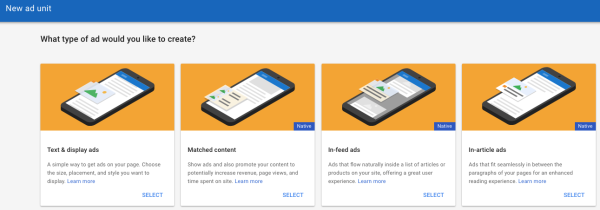
Matched content is the latest ad unit from Google AdSense that displays the suggestions of pages that contain the content of our entire web and is accompanied by advertisements from the outside. This ad only appears in the mobile version (along with Auto ads).

Text & display that can appear anywhere in our web pages.

In-article ads are ads that appear as delimiters in our articles, for example between paragraphs. With the note, the article should have an adequate length.

In-feed ads work like In-article, only, In-feeds only appear on mobile devices.

How to Use it

How to use it is relatively easy, namely by pinning the code provided by AdSense into the <head> of each page that we expect will bring Auto ads.

The code looks like this:

<script async src=”//pagead2.googlesyndication.com/pagead/js/adsbygoogle.js”>

So, you will have to make:

<head>

<script async src=”//pagead2.googlesyndication.com/pagead/js/adsbygoogle.js”>

</head>

However

Some people will be less happy with the launch of this Auto Ads, for example, the makers of AdSense tutorials like me. :_(

Bloggers Welcome the Launch of New AdSense Auto Ads


Again, New Exciting Ads Type Launched by AdSense!

Just now, I got a notification that Google has launched its new product for AdSense called AdSense Auto ads. Its name is self-explanatory, this is the type of ad that works automatically.

You have to read this tutorial at least once because after you’re finished reading this article, you won’t need other AdSense tutorials, ever!

Of course, this is not only greeted happily by the bloggers, but also by all users of AdSense. I focus on bloggers because as a blogger who does not like complicated things like me, writing is the only fun thing to do. And this is now being managed by Google AdSense.

Here’s What’s Written on its Official web:

They let you focus on creating great content. Auto ads automatically place and optimize your ads for you so you don’t have to spend time doing it yourself.

They potentially increase your revenue. Auto ads analyze your pages and find new places to show ads based on your layout, content, and existing Google ads.

They’re easy to use. You place the same piece of code just once on each page that you want to show Auto ads. Google takes care of the rest.

Those three points sound very beneficial for me.

Here it is from one step to another:

But…

There is something quite worrying for me, namely the existence of Vignette ads (which we can disregard its use manually). Vignette ads will appear every time our web visitor moves from one page to another.

Also, read here about the most effective AdSense placement.

Well, I had a bad experience with this type of ad. I think this is very annoying, and I tend to avoid nets that use this type of advertising. But we’ll see. I’m sure this is not something that geniuses in the Google lab are overlooked.

These Are The Types of Ads “Brought” by Auto ads:

Matched content is the latest ad unit from Google AdSense that displays the suggestions of pages that contain the content of our entire web and is accompanied by advertisements from the outside. This ad only appears in the mobile version (along with Auto ads).

Also, read here about Matched Content Ads.

Text & display that can appear anywhere in our web pages.

In-article ads are ads that appear as delimiters in our articles, for example between paragraphs. With the note, the article should have an adequate length.

In-feed ads work like In-article, only, In-feeds only appear on mobile devices.

How to Use it

How to use it is relatively easy, namely by pinning the code provided by AdSense into the <head> of each page that we expect will bring Auto ads.

The code looks like this:

<script async src=”//pagead2.googlesyndication.com/pagead/js/adsbygoogle.js”>//

So, you will have to make:

<head>

<script async src=”//pagead2.googlesyndication.com/pagead/js/adsbygoogle.js”>//

</head>

Also, read here to know how to insert script to your WordPress site.

However

Some people will be less happy with the launch of this Auto Ads, for example, the makers of AdSense tutorials like me. :_(

The Most Effective Google Ads for Website Placement (With Illustration)


Hi, now we’re going to talk about the most effective Google Ads for website placement. There are many tutorials that discuss where to put ads, even Google itself. But how to make the ads that we put in strategic places that work well?

In order to make the learning process easier, I highly recommend you to read the previous articles below:

Google AdSense, SEM, and SEO.

Maximize the use of WordPress widgets and themes.

Google AdSense Match Content Unit.

Illegal way to cheat AdSense.

Done? Let’s Move to Google Ads for Website Placement

If we are discussing advertising, then we will agree that as good and expensive as an ad will be meaningless if it can not be seen. In addition to making the ad not reach the target, the ad also means die from circulation. Often I see an ad, but it turned out that the ad reached me when the validity period is up. Usually, this is found in discount ads or events that are not routine. Of course, this is detrimental to advertisers and also to us as publishers are “forced” to give up our advertising columns used by useless advertisements. And Google also assumes the same. Google will not put high-value ads on websites that have low traffic.

Well, how to make ads that appear on our web pages hit the target? Let’s look at the illustrations below:

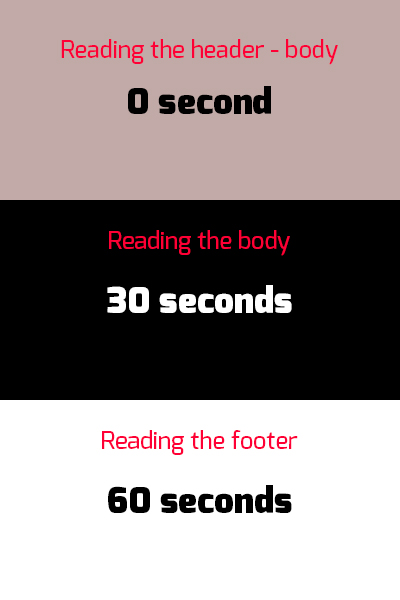
This is the time spent by your reader while reading your article
(The number made for illustration only. Actual time may vary, use a proofreader to get the actual estimation):

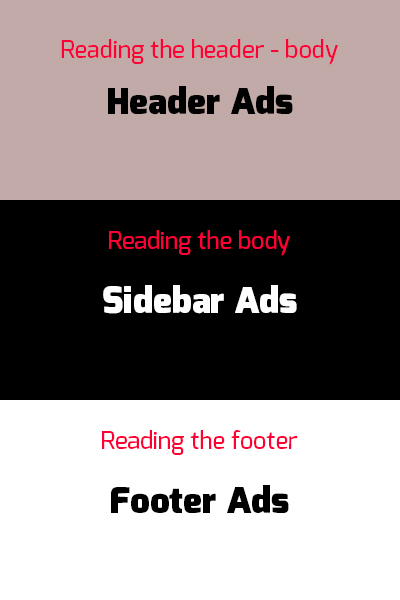
And these are the suggested Ads placements:

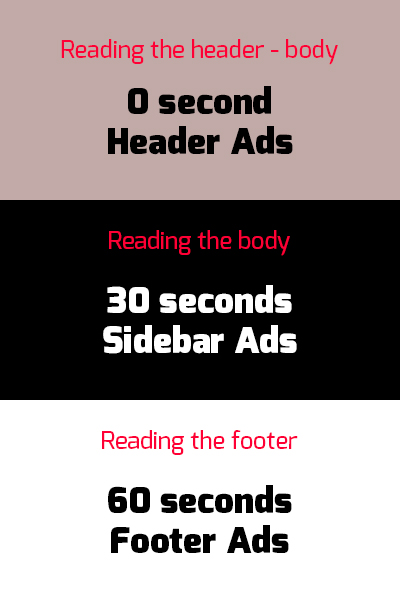
Both combined:

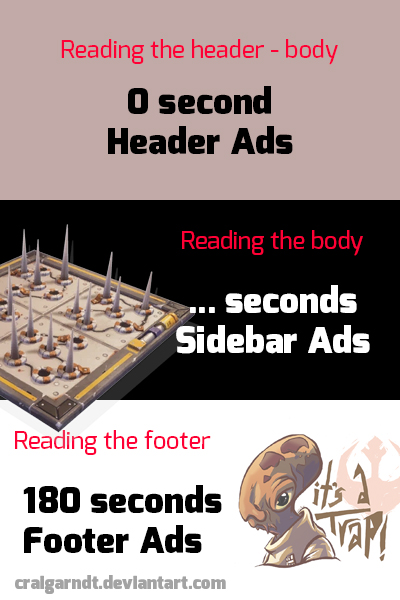
Look how fast your readers pass through the ads that have been put in these strategic places. Which means, these ads will not give more earnings (except when clicked, this is called with the term call to action). Relying on earnings per thousand impressions it will be difficult in this way. For that, we rely on the duration of impressions.

How to do it? The illustration above supposed to be self-explanatory. But to make sure we do not misunderstand, it’s good if I explain.

The trick is to “intercept” the reader in the area where we have placed the advertisement. This can easily be done using in-feed ads. Right. But it would be easily missed if the reading material does not “intercept” the reader.

Let me give you another illustration using a modified illustration from above.

This is the time spent by your reader after we put the “traps”. Don’t think anything negative or using creepy stuff, that will only make your reader leave and look for another web to find what they need. Well, unless you have one of a kind website, I think this method will work. But, I still won’t encourage you to do that.

So, what kind of trap is legal for us to use? We can put tutorials, video with certain durations that we can easily ember from YouTube* and other time-consuming things. Such as how to hold breath for 60 seconds while reading and some quizzes. Have you ever been on a website that held a polling without significant result? That’s an example of a good trap. The keyword is “time-consuming”. Hold your reader as long as possible in all of your web pages.

*Also, read how to make your own video website that earns you money.

But make sure the time they spend is beneficial to them!

How To Make Google AdSense Matched Content Unit


Recently this morning I bumped on the notification from Google when I opened my Opportunities tab on my Google AdSense account. I believe you can see the very same notification like mine on your Google AdSense account by going to Optimization > Opportunities. Google AdSense Matched Content Unit works like its name describes, sending you ads that matched your contents.

It’s not a new thing for SEO and SEM activist since there is also some other Ads agency offering the same advertisement method. Even before Google launched this Matched Content Unit. You can see some of them on gossips and software download websites. But, most of the contents are mostly from HOAX to some impossible life hacks, such as getting rich with a single click (if this really happens, I would be writing this article from my own planet, or an AI will be writing this… also on my own planet).

Everything you need to know about AdSense, SEM, and SEO

Increase your earnings

You can also show ads, so you earn money while promoting your content.


A great way to promote your content

Matched content promotes your articles, so visitors see more of your content and stay longer on your site.


More page views

Our study showed that page views increased by 9% on average, and time spent on site by 10%

Interesting, Right? Let’s Start Making Google AdSense Matched Content Unit

Google AdSense Matched Content Unit

To create a new Matched content unit:

  1. Sign in to your AdSense account.
  2. In the left navigation panel, click My ads.
  3. Click +New ad unit.
  4. Select Matched Content.
  5. Use the drop-down in the upper corner of the preview area to see which of your sites are eligible for Matched content.
  6. Give your Matched content unit a name.
  7. In the “Style” section, change the style of your Matched content unit to match your site.
  8. In the “Size” section, choose an ad size that fits your layout.

Also read: AdSense in WordPress

Please note that you will only see this option if your web is eligible to show this Ad Unit. Follow this step to find out:

To check the eligibility of your site:

  1. Sign in to your AdSense account.
  2. In the left navigation panel, click Settings.
  3. Click My sites.
  4. Under “My sites”, click Matched content.
    If you don’t see Matched content under “My sites” then you’re not currently eligible to use the Matched content.
  5. On the “Matched content” page, check to see if your site is listed:
    • If your site is listed, you may place Matched content units on any of its pages.
    • If your site isn’t listed, then it’s not currently eligible for Matched content.

If at least one of your sites is eligible, you’ll see the option to create Matched content units under the My ads tab in your account.

Google AdSense Matched Content unit will also cover your subdomain. So, if you have let’s say digressingme.cool, then movies.digressingme.cool will be included as one of the eligible sites.

Also, read: Illegal Way to Cheat AdSense

If you own multiple sites

If you’re a publisher with multiple sites, you might find that only some of your sites are eligible for Matched content. In this case, we ask that you only place Matched content units on your eligible sites. If you place Matched content units on ineligible sites, then we won’t be able to populate the units with recommendations.

Conclusion

Basically, Google AdSense Matched Content Unit offers the same result as if we put our internal link on the articles. See the “Also reads” link I put here? But, it also enables you to monetize your link instead of merely just opening a new page.

Keseimbangan Kerja dan Hidup

Keseimbangan Kerja dan Hidup


Siapa Yang Gak Mau Punya Keseimbangan Kerja dan Hidup?

Mungkin ada di antara pembaca yang mikir gini. “pertanyaan apa sih nih? Kok tolol bingitz?” Gw gak mikir seperti itu sih, cuma memang kebetulan kata “keseimbangan kerja dan hidup” ini baru secara gak sengaja gw temuin. Nemuinnya juga di background foto yang jadi banner salah satu situs. Kebetulan kali yes? Atau suratan?

Kalau aja kata-kata ini udah gw temuin dari dulu. Kayanya bisa menghemat ribuan menit gw yang terbuang dengan menjelaskan sesuatu secara ribet.

Jadi begini… ehem…

Gw sempat masuk ke dalam rutinitas kerja yang sumpah sangat-sangat membosankan. Walaupun “katanya” setiap hari selalu ketemu orang yang berbeda, nyatanya tiap hari gw cuma berhubungan sama orang yang itu-itu aja. Waktu itu gw dan teman-teman joinan buka konter hape. Masih jaman Nokia apa tuh yang bentuknya kaya Doraemon?

Terus terang, dari konter hape ini gw ngerasa nyari duit itu gampang banget. Yaeyalah, tinggal duduk orang nyamperin kok. Apalagi yang jadi jualan unggulan kami waktu itu adalah konten hp, yang “cuma” butuh kreativitas dan waktu rutin bayar listrik. Bukannya menyombong atau mengilhami kalian buat jualan konten hape (walaupun mungkin masih laku di tempat kalian), dari satu pembeli aja minimal kami dapat 100-300ribu. Bahkn ada yang berjam-jam nongkrong di depan konter kami dengan muka ga meyakinkan (tapi juga bukan muka maling) dan tahu-tahu begitu sepi dia beli seluruh folder kerja kami (dengan cara dikopi, jadi kami tetap punya masternya).

Lalu Apa Kekurangannya?

Lalu gw ingat tiga K, yaitu…kekeke… (udah, itu doang).

Gw ingat kalau setelah menjalani beberapa saat, kok gw malah lupa dengan alasan dan motivasi gw kerja, yaitu keluarga. Gw ini tipikal yang sangat-sangat family man. Lebay banget deh… bentar-bentar ngecek anak, terus paling marah kalau anak gw kurang pengawasan. Waktu itu anak gw masih balita. Sebelum terjun ke urusan hape ini, gw mengais nasi sebagai musisi. Ya untunglah gw lahir di era di mana rocker juga manusia. Gak semuanya serba digital dan instant, walaupun di era digital ini gak semuanya mudah juga.

Ujung-ujungnya, hasil gw cari duit ini bingung mau buat apaan lantaran bener-bener ga ada waktu buat rumah. Kalau dibandingin sama romusha, jelas parahan romushalah. Kembali ke ujung tadi… akhirnya duitnya kepake dikit-dikit sama orang yang paling gampang ditemuin aja dengan tujuan melepas penat. Jadilah ke diskotik. Sampai sekarang juga masih mau sih maen-maen ke diskotik lantaran ada beberapa gerakan ala Black Eyed Peas yang belum sempat gw praktekin, eh tapi udah ditutup sama Pak Gubernur.

Lalu gw memutuskan banting setir..ciiiiiiiiiiiit…

Gw buka distro, yang gak jelas dan ujung-ujungnya gw tinggal. Lalu gw kerja di rumah aja. Buka jasa cetak dan desain, sekaligus ngasuh anak. Tapi pemasukannya minus terus. Setelah beberapa kali kena dan hampir kena tipu segala macam tawaran peluang hidup gampang… Gw terhenyak dengan kata-kata salah satu almarhum teman gw (dia ngomong ini sebelum jadi almarhum, jadi tenang aja bacanya), “mau berapa banyak lagi bakat yang bakallu buang?”

Ini pertanyaan sekaligus sindiran yang kena banget buat gw saat ini dan masih berbekas sampai sekarang. Kenapa? Karena dia di atas gw dari segi mutu dan pelayanan. Tapi secara gaya hidup… dia pas banget sama gw. Berhubung dia udah meninggal duluan, berarti gak semuanya kudu ditiru sih ya?

Nganggur

thatbaldguy / Pixabay

Kembali ke soal keseimbangan kerja dan hidup…

Lu ngerasa bingung mau ngapain? Pikirin apa yang bisa lu kerjain, lalu kerjain. Mulai dari iseng aja kok. Gw mulai nulis ini juga dari iseng, eh lama-lama ketagihan. (Soalnya di sini gw tahu gak bakal dikepohin sama Suneo hohoho…)

Pikirin apa yang bikin lu berhenti ngerjain sesuatu yang lu cintai (dan sukur-sukur produktif), apakah:

amzn_assoc_placement = “adunit0”;
amzn_assoc_search_bar = “true”;
amzn_assoc_tracking_id = “digressingme-20”;
amzn_assoc_search_bar_position = “bottom”;
amzn_assoc_ad_mode = “search”;
amzn_assoc_ad_type = “smart”;
amzn_assoc_marketplace = “amazon”;
amzn_assoc_region = “US”;
amzn_assoc_title = “Kerja Di Mana Aja”;
amzn_assoc_default_search_phrase = “wireless mouse for samsung tab”;
amzn_assoc_default_category = “All”;
amzn_assoc_linkid = “b01414854cf67f5a44d5a545d8667ed2”;

//z-na.amazon-adsystem.com/widgets/onejs?MarketPlace=US

Pernah juga gw terhenyak sama radio, dan bukan lantaran kesetrum pas nyolokin radio. Di radio (tanpa notasi Gombloh R.I.P) gw denger ada yang lagi dkwah bilang gini, “tiap orang dikasih gayung dengan ukuran yang berbeda-beda. Walaupun mereka ngisi air bareng-bareng di laut yang sama, tapi mereka bakal dapat jatah air yang berbeda.” Ini keren loh sob… realistis gitu perumpamaannya. Gw yang lagi nyisir ngaca sampe diem dulu, sambil mengagumi ciptaan Tuhan yang luar biasa ini.

Tetap harus ingat untuk menjadikan kerja dan hidup itu jalan selaras. Bukan cuma masalah waktu, tapi juga untuk urusan prioritas. Jujur aja sih, sampai sekarang gw lebih memprioritaskan keluarga. Cuma apa gunanya juga cuma dengerin orang curcol kalo abis dia beres malah gantian kita yang curcol juga kan? Malu dong…nggg…udah gede.

Inget-inget nabung juga perlu, lantaran hukum alam semesta yang bilang, “lu bakal dapetin apa yang lu usahain” itu gak bilang kalau, “yang lu capek-capek sekarang bakal lu nikmatin sambil santai”. Gimana caranya biar bisa nikmatin sambil leha-leha? Ya nabung itu tadi.

Hindari Pensiun Dini

Hidup di negara tercinta ini ya otomatis hidup dengan berbagai basa-basinya yang menurut gw kok nyuruh buru-buru terus ya?

Contoh:

  • Baru lahir, disuruh cepet gede.
  • Gedean dikit, disuruh cepet bisa jalan padahal pas udah jalan disuruh diem aja jangan ke mana-mana, takut hilang di pasar katanya. Padahal waktu itu lagi mainnya di kebun. Kok bisa hilangnya di pasar sih?
  • Udah masuk sekolah, disuruh cepet lulus.
  • Udah lulus, disuruh cepet cari kerja. Ini yang kadang-kadang jebakan Batman sih… lantaran sebagai anak harus tahu diri udah digedein orangtua, akhirnya kita mau gak mau milih karir yang gak kita sukai.
  • Udah kerja, disuruh cepet kawin.
  • Udah kawin, disuruh cepet punya anak.
  • Udah punya anak, disuruh nambah.
  • Udah nambah disuruh tambah penghasilan.
  • Akhirnya gak tercapailah niatan buat dapet keseimbangan kerja dan hidup tadi.

Satu yang bisa lu bilang ke yang nyuruh cepet-cepet, yaitu “Eh, eloh yang udah nyuruh gw cepet-cepet, jangan ngehalangin apalagi nikung gw dong loh”.

Lantaran serba diburu-buru, kita keburu lelah sebelum waktunya. Ujung-ujungnya jadi pensiun dini. Padahal masih banyak kesempatan yang bisa diambil kalau kita mau. Ya gitu deh kalo udah keburu muak sama rutinitas. Tapi kalau bisa sih jangan. Malu dong sama opa-opa bule di luar sana yang walaupun kulitnya kaya cucian tanpa softener tapi masih pede godain yayanglu di sosmed.

amzn_assoc_placement = “adunit0”;
amzn_assoc_search_bar = “true”;
amzn_assoc_tracking_id = “digressingme-20”;
amzn_assoc_search_bar_position = “bottom”;
amzn_assoc_ad_mode = “search”;
amzn_assoc_ad_type = “smart”;
amzn_assoc_marketplace = “amazon”;
amzn_assoc_region = “US”;
amzn_assoc_title = “Padahal tuh opa-opa gak pake ini:”;
amzn_assoc_default_search_phrase = “skin softener”;
amzn_assoc_default_category = “All”;
amzn_assoc_linkid = “1d3c1a5c95fef3c2701d84a7c528690d”;

//z-na.amazon-adsystem.com/widgets/onejs?MarketPlace=US

Jir… Apa Urusannya Sama Hayday?

Inti dari tulisan ini ya kaya Hayday… intinya adalah manajemen waktu dan usaha tentunya. Lu ga boleh ngarepin sekaya tetanggalu kalau dia juga start awalnya udah beda. Percaya aja sama “gayung” yang udah jadi bekal hidup. Terus isi sampe penuh. Tapi inget, waktu ngabisinnya ya sama yang jadi motivatorlu buat kerja. Gimana, sekarang merasa termotifasi sama tulisan gw ini? Gw udah jadi motivatorlu dong? Ayo sini setoran!


Keseimbangan kerja dan hidup itu penting sekali buat kamu yang merasa bahwa hampir semua waktu kamu habiskan buat bekerja, namun kamu tidak memiliki partner untuk mengapresiasi pencapaian kamu-robocopehinimahbukanquotesda…