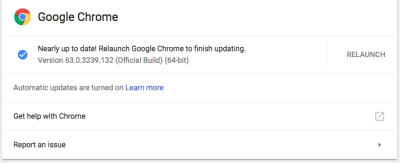
How To Get Google Chrome Update Dev 66, Beta 65, Stable 64


Google Chrome Update

Getting Google Chrome updates can only be done through Chrome itself, unlike Chromium’s open-source update which we can deliberately choose. For Chromebook users, this is highly anticipated, as there will be no updates except those already announced by Google. For example, as I wrote about the latest update in the previous article.

This is how to get Google Chrome Update:

On Chromebook:

  1. Click on your profile picture on the lower right of your screen.
  2. Go to settings.
  3. Click on three stripes on the top left to reveal About Chrome.
  4. Click on the version area to update.

It will be updated automatically (restart needed), you can conveniently keep using your Chromebook. You can also change the channel here, but I won’t recommend it unless you really need to play with this.

On Other Computer:

  1. Click three dots button on your upper right.
  2. Go to settings.
  3. Click on three stripes on the top left to reveal About Chrome.
  4. Click on the version area to update.

You will then have to relaunch Chrome manually.
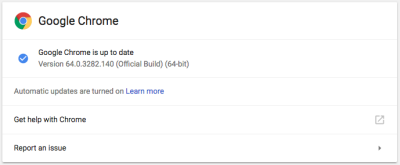
What’s New in This Google Chrome Update?

Developer Channel

The Dev channel has been updated for Mac and Linux, and 66.0.3343.3/.4 for Windows.

A partial list of changes is available in the log. Interested in switching release channels? Find out how. If you find a new issue, please let us know by filing a bug. The community help forum is also a great place to reach out for help or learn about common issues.

Also, read Chromium 64-bit for Mac.

Beta Channel

Chrome 65.0.3325.51 contains our usual under-the-hood performance and stability tweaks, but there are also some cool new features to explore – please head to the Chromium blog to learn more!

Stable

64.0.3282.140 for Windows, Mac, and Linux.

Problem With Your Chrome?

You can try doing the steps below and see if it helps:
  • Use incognito mode. If this helps to solve the problem, then temporarily disable your extensions to identify which one is causing the rendering problem. To do this go to chrome://extensions and uncheck Enabled for each extension one by one.

  • Remove unwanted programs from Chrome.

  • Your profile account might have been corrupted. Try creating a new browser user profile and check if that makes a difference.

  • Reset your browser settings.


What Is Chromebook, Chrome Themes, and Google Chrome Update


In this post, we will talk about, “What Is Chromebook, Chrome Themes, and Google Chrome Update?”

Chromebook is a Linux laptop, running on the ultra-lightweight operating system called Chrome OS. Sounds familiar? Of course, because this is the sibling of Chrome web browser we’ve been using for about a decade now.

Read more about the history of Chromebook here.

But, why?

Have you ever used a laptop with 8GB memory, 1GB graphics card, and 3TB of storage media just for doing office work?

Maybe the answer is, yes! That’s if you work in an advertising company or post-production house. If not … imagine how many laptop resources been wasted while using the laptop just to send an email and other tasks that deal with the internet.

The average price of Chromebooks is below the price of laptops in general, and of course is well below the price of the MacBook Pro.This is possible because Chromebooks have a specific target, the internet user. Therefore, the Chromebook is also equipped with a specification that is only fitting for it. Plus, Chrome OS is so light, allowing Chromebooks to run with just 2GB of RAM and 64GB of storage. Thanks to the use of SSDs here. For those who like to dismantle pairs of laptops, Chromebook allows for upgraded both memory and storage.

The storage is very limited in size, but that shouldn’t be a problem since we store everything on Google Drive.

[edsanimate_start entry_animation_type= “bounceInLeft” entry_delay= “0” entry_duration= “0.5” entry_timing= “cubic-bezier(0.55, 0.085, 0.68, 0.53)” exit_animation_type= “bounceOutRight” exit_delay= “0” exit_duration= “0.5” exit_timing= “cubic-bezier(0.165, 0.84, 0.44, 1)” animation_repeat= “1” keep= “yes” animate_on= “scroll” scroll_offset= “75” custom_css_class= “”]

[edsanimate_end]

Let me describe what we can access/put in the cloud:

  • Mail —> GMail
  • Storage —> Google Drive
  • Documents —> Google Docs and also accessible through Drive
  • Videos —> YouTube

For more serious (or rich) users, Chromebooks are also manufactured with higher specifications at a relatively cheaper price. Chromebooks include everything for free out of the box, and you can add paid apps if you want via Chrome Web Store.

Read about Chrome Web Store here.

amzn_assoc_placement = “adunit0”;
amzn_assoc_search_bar = “true”;
amzn_assoc_tracking_id = “digressingme-20”;
amzn_assoc_search_bar_position = “bottom”;
amzn_assoc_ad_mode = “search”;
amzn_assoc_ad_type = “smart”;
amzn_assoc_marketplace = “amazon”;
amzn_assoc_region = “US”;
amzn_assoc_title = “My recommendation:”;
amzn_assoc_default_search_phrase = “Chromebook”;
amzn_assoc_default_category = “All”;
amzn_assoc_linkid = “6f412e4739f1e14633a3387ea002d23e”;

//z-na.amazon-adsystem.com/widgets/onejs?MarketPlace=US

Chrome Themes

Almost 99% of my activities on Chromebooks are in the Chrome browser. There is almost no time to see my desktop wallpaper. So I have to minimize Google Web Browser to see my wallpaper.

Read more about Themes here.

No matter how my surfing activities, over time it will become boring because it should always look at a blank screen that is only decorated with text. That’s why I feel the need to customize my Chrome web browser by going to Chrome Web Store and choose the theme I want. There is a wedge for me, the “theme that works cool” was found in the extension category.

Read about how to make and sell web apps on Chrome Web Store.

Google Chrome Update

Chrome regularly sending updates to improve both Chromebooks and Chrome Web Browser. It’s available in three categories, stable, beta and dev. Stable is for casual user while Beta is Google’s experiment, glitch expected. Developer mode, on the other hand, lets the user do massive tweaking, included replacing the Chrome OS to other operating systems.

This is the luxury of Chromebook user that Chromium users don’t have.

Read more about Chromium here.