
Chrome OS for PC
Chrome OS for PC: If you’re a regular visitor to this website, you will know how misguiding is this article is titled. Chrome OS is made exclusively for Chromebook. End of the story. However, it’s still possible to install Chromium OS (an OS built from the same stone as Chrome OS) on your PC or Mac. This article will guide you how to get Chromium OS for PC.
But, why?
Just like Chrome OS, Chromium is an ultra lightweight operating system designed just enough to fulfill your online computing needs. Pay attention when I said online, ’cause honestly, without any internet connection, Chromium OS (and Chrome OS)is just like a cool car running out of gas.
What you need:
- Chromium ISO
- A USB disk
Read this to learn more about Chrome OS history.
What to do:
- Download Chromium ISO from Neverware.
- Create a Chromium installation Live USB using Chromebook Recovery Utility. You can get this tool by installing Chrome web browser.
- Choose Use Local Image instead of choosing your computer model.
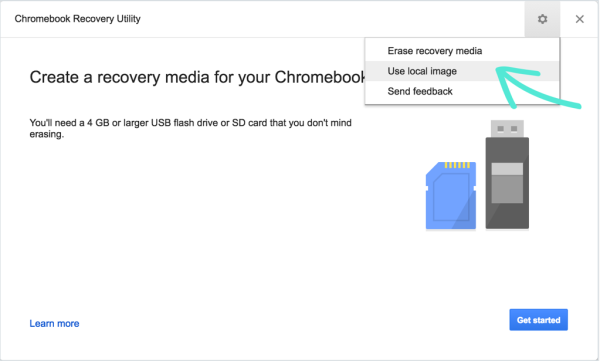
- Navigate to the Chromium installer we just downloaded.
- Click Get Started.
- Grab a coffee and watch some movies.
- Turn your PC off and boot it from BIOS.
- Set your startup disk so your next startup will be using the Live USB you just made earlier.
- Follow the on-screen instruction.
- Don’t forget to unplug your Live USB before restarting. Chrome will make it obvious to you.
TIPS: Don’t use ZIP for making the Live USB, but use BIN instead. Get Bin by extracting the ZIP file.
Here is why:
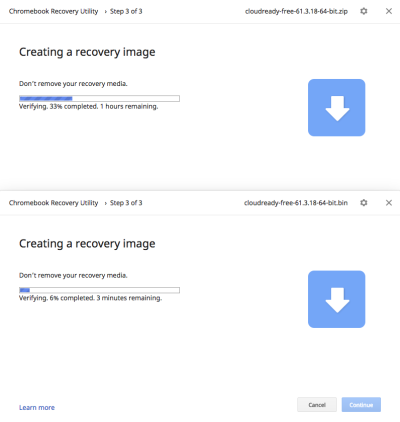
<— This one uses .ZIP.
<— and this one using BIN started hours later. FML.
That’s it! You’re ready to go.
Next Steps:
Like Chrome OS, you will have to log in using your Google Account and then check the following tutorials I made for Chrome OS:
Some might work and some other might not even accessible.
Read this to learn more about Chromium.
A Mac user?
Read this article for installing Chromium OS on your MacBook Air.
The Result
Your PC with the new fresh Chromium installation will behave like “normal” Chromebox, only without auto- update. But you can join the community and pay for a small amount of money to get a full life support for your Chromium PC. And that’s interesting.
So, what do you think about this OS? Is it better than just opening Chrome web browser on our laptop? Let me know in the comment below.
 bipolar is-popular_